
You type a name into Contacts and wait. Ten seconds, sometimes more, before anything appears. Or the search comes back empty for someone you know is in there.
Before iOS 27 it was instant, which makes this all the more annoying. The change is real, too: 169 people on Apple's forum have clicked Me too on the same complaint.
I will not promise you a fix, because no one in the thread has reported one yet. Instead, you get the workaround owners use, what Apple says about searching after an update, and what to skip.
What owners are seeing
The thread's first post put it plainly: "the Contacts search function stopped working". A day later they added the detail that matters.
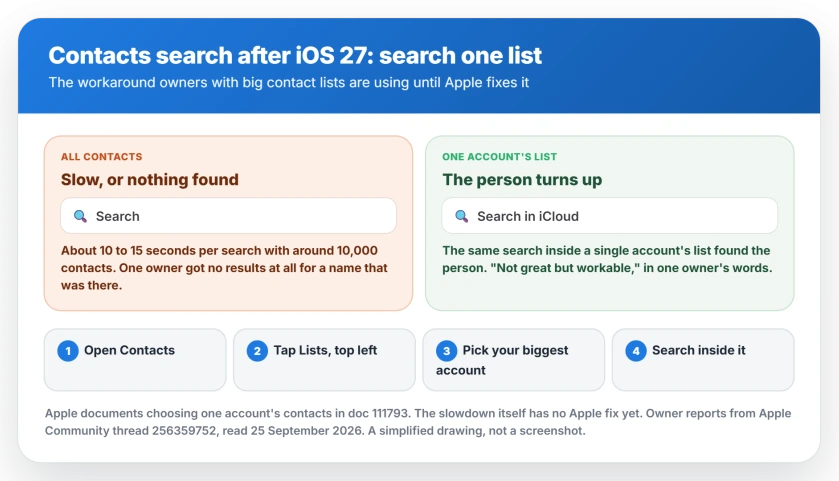
"I have approximately 10,000 contacts," they wrote. Searching now takes about 10 to 15 seconds for results to appear, where it used to be close to instant.
A second owner saw a different symptom. For them, searching "All Contacts" came up with nothing, while the same search inside one account found the person.
Both point the same way. My reading, and it is ours: the combined All Contacts search is where iOS 27 struggles, and big lists feel it most.
1. Search one account's list, not All Contacts
This is the workaround owners actually use. Apple documents the feature behind it on its contacts management page.
In Apple's words: "If you have multiple accounts set up in the Contacts app and want to review contacts for a specific one, open Contacts and tap to select the one you want to review."
So open Contacts, tap Lists at the top left, and pick one account, such as iCloud or Gmail. Then search inside that list.
The owner who found it called it "Not great but workable as a workaround until apple fixes the issue." Another suggested picking "the contact list in which you have maximum contacts" first.
2. Leave it on the charger for a few nights
Apple says a major update keeps your iPhone busy behind the scenes for some time. Its software update page lists search indexing among the jobs it finishes afterwards.
One of the forum's Level 10 advisers applied that to Contacts. Their advice was to "give this a couple days", because "your phone has to work behind the scenes to reindex the millions upon millions of bytes of data."
So leave your iPhone plugged in and on Wi-Fi overnight for a few nights. That is ours as a routine, not Apple's, but it gives the indexing its best chance.
Photos goes through the same kind of rebuild, and its indexing only runs while the iPhone is locked and charging.
Waiting has its limits, though. One owner wrote on 24 September: "tomorrow will be two weeks since I've updated to 27."
3. Force restart once
Another Level 10 adviser suggested you "try a forced-restart" first. It only takes a minute.
Press Volume Up, then Volume Down, letting go of each straight away. Then hold the Side button and keep holding. Release it once the Apple logo shows, which may take up to 20 seconds.
The thread has no report of a restart fixing search on its own. Do it once, then move on.
Two things to skip
Do not erase your iPhone for this. One owner restored factory settings "with no results", and the slow search came straight back.
Do not delete a contacts account to shrink the list either. Apple says removing an account takes its contacts off your iPhone.
They stay in the account online, but you would lose them from your phone to test a guess. The one-list workaround gets you the same result without that risk.
Tell Apple
My reading: this is an iOS 27 fault that Apple has to fix in an update. Nothing in the thread points to a setting you have wrong.
Apple's iPhone feedback page is the place to report it. Mention iOS 27, roughly how many contacts you have and which accounts they sit in.
If Contacts also says your blocked list is full, that is a separate iOS limit. The Blocked Contacts limit has its own fix.
Status: iOS 27.0, checked 25 September 2026. Owners with large contact lists report Contacts search taking 10 to 15 seconds or returning nothing in All Contacts since iOS 27. Searching one account's list is the workaround in use. Apple has not acknowledged it. Waiting two weeks and a factory reset have each failed for one owner, and no fix exists yet.
Why is Contacts search so slow after iOS 27?
Owners with large contact lists report it since the update, with searches taking 10 to 15 seconds. Apple says a major update keeps your phone indexing for search for some time, but for one owner it has lasted two weeks. Apple has not acknowledged it.
Why does Contacts search find nothing in All Contacts?
One owner found All Contacts returning nothing for a name that the same search found inside their iCloud list. Search one account's list instead until Apple fixes it.
How do I search just one contacts list?
Open Contacts and tap Lists at the top left, then choose one account, such as iCloud. Apple documents this for reviewing contacts in one account. Your search then covers that list only.
Will resetting my iPhone fix Contacts search?
Not in the reports so far. One owner restored factory settings with no change. Try the one-list workaround and a few nights on the charger first.
The Short Version
- Contacts search is slow or empty for some owners since iOS 27.
- Big contact lists are hit hardest, with 10 to 15 seconds per search reported.
- Search one account's list instead of All Contacts. Apple documents picking a list.
- Leave the iPhone on the charger and Wi-Fi overnight for a few nights.
- Force restart once, though no report says that alone fixed it.
- Do not erase the iPhone or delete a contacts account for this.
- Report it on Apple's iPhone feedback page. There is no fix yet.
Where to Next
Switch to your biggest single list today and see whether searching feels normal again. It is the one workaround that owners actually use.
If your phone is also running warm or draining since the update, that is the same background work. Battery drain after iOS 27 has its own timeline.
Has an iOS 27 update fixed your Contacts search, or did something else work? Share it in the comments with how many contacts you have, and I will add what works.

Isaac Smith is the founder and editor of PC Glance, a website that covers computers, laptops, and technology. He is a tech enthusiast and a computer geek who loves to share his insights and help his readers make smart choices when buying tech gadgets or laptops. He is always curious and updated about the latest tech trends.