
It is frustrating when your AirPods Max drop off your iPhone every day and only a reset brings them back. Before you reset them again, I would lift the ear cushions off, because one owner found the cause there.
Their left cushion sat upside down and covered the small hole for the head sensor. Turning it the right way and cleaning the sensor ended months of drop-outs.
How a cushion can cut the sound
In their words: "I had the L cushion upside down so the hole for the head detection was covered while the right one was just right."
AirPods Max watch whether they are on your head. Apple says: "If you remove your AirPods Max from your head, audio pauses."
Ours: with that sensor covered, the headphones may decide they are off your head. That would explain pauses and drop-outs that no firmware update cures, and it matches what the owner saw.
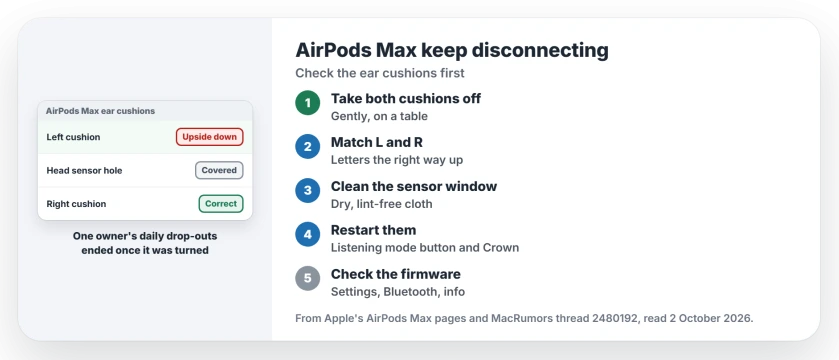
Status: checked 2 October 2026. One owner's drop-outs ended after fixing an upside-down ear cushion and cleaning the sensor. Apple's restart and reset steps come after that check.
1. Take both cushions off
The cushions come away from the ear cups, and Apple's cleaning guide starts the same way: "Remove the cushions from the ear cups." Ours: pull each one straight off, gently.
Do it on a table, not over your lap. You want to see both the cushion and the cup underneath it.
2. Match L and R, the right way up
Apple's AirPods Max guide is clear about sides: "Your AirPods Max ear cushions are marked with L and R."
Sides are only half of it. The owner's cushion was on the correct cup but upside down, so the hole in the cushion missed the sensor.
Ours: hold the headphones with the band on top and read the letter inside each cushion. If it reads upside down, turn that cushion round before you snap it back on.
3. Clean the sensor window
The owner also cleaned "the dust out of the sensor", and that was half of their fix. A dry, soft, lint-free cloth is enough.
Apple warns against wipes in one place: "Don't use on the knit mesh canopy and ear cushions of your AirPods Max." So keep alcohol wipes off the cushions and the mesh.
4. Restart, then reset if needed
Charge them first. Apple says to "charge your AirPods Max to at least 50 percent" before you restart or reset.
To restart, Apple has you hold the listening mode button and the Digital Crown "until the LED flashes amber." Then put them on and test.
A reset is the bigger step. Apple's instruction is to hold the same two buttons "for 15 seconds, until the LED flashes amber, then white", then connect them to your iPhone again.
5. Check the firmware version
Apple lists the current builds: AirPods Max 2 on 9A348, AirPods Max 1 (USB-C) on 7E108 and AirPods Max 1 (Lightning) on 6F25.
To see yours, open Settings, tap Bluetooth, then tap the small i beside your AirPods Max. Apple says new firmware arrives by itself during charging, near an iPhone on Wi-Fi.
Where waiting and resets fell short
Waiting did not. They wrote: "I thought it was a software issue that would be fixed in a future firmware update". Updates came and the drop-outs stayed.
Force resets only bought time too. Before the cushion fix, the headphones "wouldn't connect back to my devices until force resetting them", and the fault returned the next day.
If your AirPods jump between your iPhone and Mac instead, the AirPods switching page covers that. And for drop-outs on AirPods earbuds, the cutting out page has the steps.
Why do my AirPods Max keep disconnecting?
One owner traced daily drop-outs to an ear cushion fitted upside down, which covered the head sensor. Check both cushions before you reset or replace anything.
Can AirPods Max ear cushions go on the wrong way?
Yes. One owner found a cushion fits upside down on the right cup, so the letter inside it is your guide. Apple marks each one L or R.
How do I reset AirPods Max?
Charge them to at least 50 percent first. Then hold both the listening mode button and the Digital Crown for 15 seconds, and let go after the amber and then white flashes.
The Short Version
- Take both ear cushions off.
- Match L and R to the right cups.
- Make sure neither letter reads upside down.
- Clean the sensor with a dry cloth.
- Restart, and reset only if needed.
- Check the firmware in Bluetooth settings.
- One owner's drop-outs ended this way.
Where to Next
Take the cushions off tonight and look at the letters inside them. One minute with them may save you another reset.
If your AirPods Max still drop out with both cushions right, tell me your model and firmware. I will add what other owners find.

Isaac Smith is the founder and editor of PC Glance, a website that covers computers, laptops, and technology. He is a tech enthusiast and a computer geek who loves to share his insights and help his readers make smart choices when buying tech gadgets or laptops. He is always curious and updated about the latest tech trends.