
One AirPod is squealing, whistling or chirping, and it only does it with noise cancellation or Transparency switched on.
Before you send it back, I have to tell you that this is usually not the earbud at all.
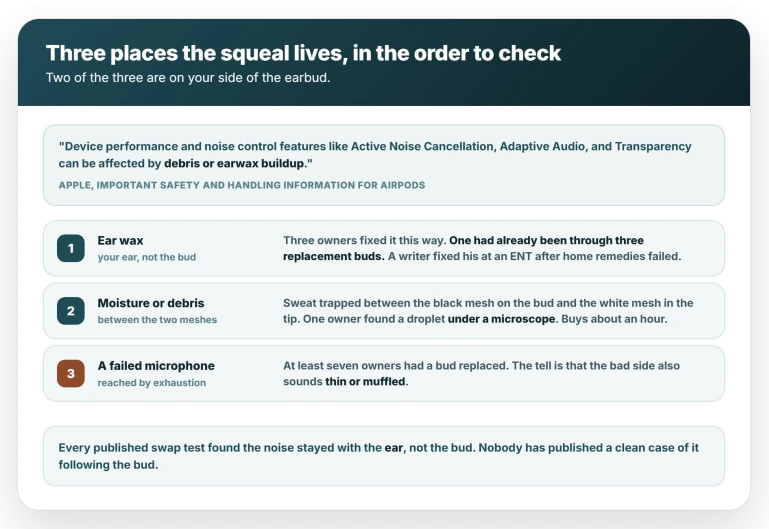
Every published swap test found the noise stayed with the ear rather than moving with the AirPod, and that completely changes what you should do about it.
Wax, and why it comes first
Three owners fixed this by dealing with wax, and their routes differed.
One had already been given two free replacement buds, three in total, before trying an irrigation kit at home.
On roughly the fourth cycle a piece of solid wax came out, and he put his AirPods straight back in: "just like that, the sound was gone".
Another used olive oil over several days and reported the whistling much reduced. A third went to his doctor, who found a lot of wax and cleared it.
A technology writer published the same conclusion in October 2025, and his home remedies failed first: he had used cotton buds and hydrogen peroxide "a handful of times" with no luck before an ENT cleared it properly and the noise went.
So home methods sometimes work and sometimes do not. If yours does not, a professional clearing is the reliable version, and it costs less than a new pair of AirPods.
Moisture and debris under the ear tip
The second cause on your side of the earbud is what collects between two mesh surfaces: the black mesh on the AirPod and the white mesh inside the ear tip.
Owners who pulled the tip off found the evidence directly.
One saw the moisture after eight-hour shifts on a construction site and cleared it three separate times, the noise stopping immediately each time.
Another put an AirPod under a microscope, found a droplet of sweat in the grille that was invisible to the naked eye, and reported the whistle "gone like nothing happened".
Debris is a separate case from moisture and gets missed.
The second-highest-rated answer in one discussion comes from an owner who insists his problem was neither wax nor moisture but a particle stuck in the black mesh, and two other owners confirmed the same.
Apple's method for that mesh is micellar water, and it covers the Pro 2 and Pro 3 only.
Know how long the drying lasts. The owner who worked out the moisture mechanism re-does it roughly every hour on a long bike ride.
It is a reprieve rather than a cure, and part of the effect may just be the pause while the AirPod is out of your ear, because several owners find five minutes to an hour in the closed case clears it too.
Two cheap things while you are here. Rest them in the case with the lid open, because one owner found a closed case too small and humid for moisture to escape and got two clear hours that way.
And fit them where the air is still: one owner reports the fault latching at the moment of insertion, so fitting them in a breeze leaves the noise there whatever you do next.
The swap test, and what it has actually shown
Put the right AirPod in your left ear and the left in your right, wear each for as long as the noise normally takes to start, and listen.
Be clear about what this has produced so far. Three owners have published a result and all three found the noise stayed with the ear.
One wrote that he moved the right AirPod into his left ear "and it still happens in the left, so I'm guessing it's an issue with my ear canal".
Another put it down to the anatomy of an ear rather than the hardware. A third found that after swapping, both buds squealed, and concluded it was not a defect in a single earbud.
No published case has the noise following the bud. That does not make it impossible, and if yours does follow the bud you have your answer early. It does mean you should not expect it.
The same swap means something different for AirPods cutting out: there, a dropout that follows the bud points at a clogged mesh to clean.
For a squeal, cleaning is what you have already been doing.
Rotating the ear tip
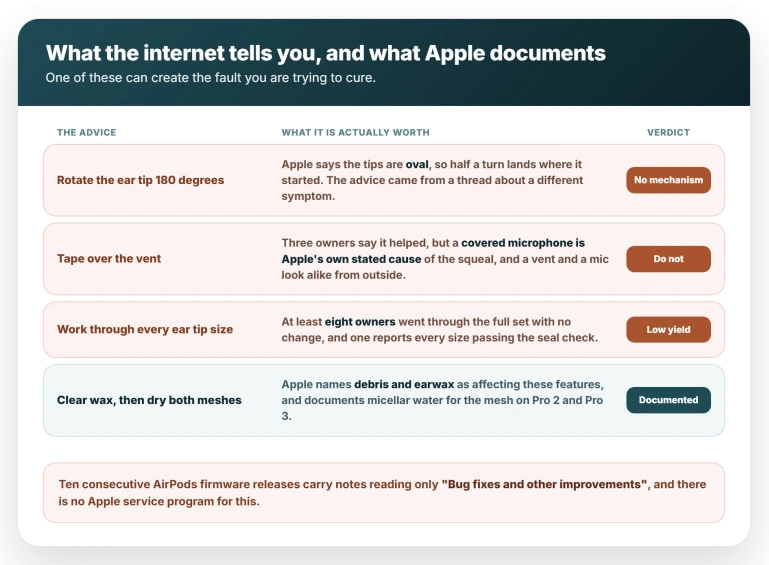
The most repeated fix online is to pull the ear tip off and refit it turned 180 degrees. Be sceptical of it.
Apple's cleaning page says the tips are oval and must be aligned before they click on, and an oval turned half a turn lands where it started, so there is no obvious mechanism for the rotation itself.
The owner behind the moisture theory argues people are really getting the removal, the drying and the refit.
Against him, one owner reports it working with no drying at all, and another reports 180 degrees failing while 90 worked, which is a forced misfit and not one to copy.
Either way, do the part nobody disputes: pull the tip off, dry both mesh faces, and click it fully and squarely back on until it clicks.
What Apple documents about covered microphones
Apple names this symptom in its noise cancellation guidance, in words that match the complaints:
> "Blocked or covered microphones may cause temporary high-pitched squeals, chirps, feedback, or other audio performance issues."
Several owners describe the squeal appearing when they hold an AirPod in a closed fist, lie on it, or pull a beanie over it.
Two cite the closed-fist test as proof the problem is not ear tip fit, without knowing they are describing Apple's stated cause.
Across all 191 replies in the two main discussions, not one cites that page.
It does not explain everything. Three owners report the opposite, that covering an opening helped, one by taping over a vent.
A vent is not a microphone, they look alike from outside, and a covered microphone is Apple's own stated cause of the squeal. Do not tape over anything.
The seal check is model-specific, Ear Tip Fit Test on Pro 1 and Pro 2 and Acoustic Seal Test on Pro 3, but it is not a reliable guide here: one owner reports every size passing, another that it missed a fault he could plainly hear.
Tip sizes need not match between ears, which we cover in AirPods sound shifting to one ear.
When it really is the hardware
You reach this by exhaustion rather than by a single test. At least seven owners had a fault found and a bud replaced, and several were told a microphone had failed.
The symptom that genuinely points at hardware is sound quality: the owners whose affected side also sounded thin, hollow or muffled were the ones who ended up with a replacement.
Expect the diagnostic to pass. It often does while the fault is real, because the noise comes and goes, and one owner had a remote diagnostic taken while his AirPods were still symptomatic after a ride that showed nothing.
A clean result is not a refusal, so ask anyway.
Swapping the hardware often changes nothing, though. Owners here are on their third and fourth sets with the same noise. If a replacement squeals too, that is the swap test telling you something about your ears.
It is not new, and it is not an iOS 26 fault
Hardly any owner names an iOS version: across 191 replies there are three attempts. They talk about AirPods firmware instead, and ten consecutive releases carry notes reading only "Bug fixes and other improvements".
The complaint is much older than iOS 26, with near-identical reports on AirPods Pro 2 from October 2023 and on the original AirPods Pro from November 2019.
What is new is the volume, and the timing explains that: the busiest discussion opened one day after AirPods Pro 3 went on sale.
Nor is it confined to the Pro 3. Owners report it on AirPods Pro 2, which shares a firmware build with the Pro 3, including a fresh case from August 2026.
Has Apple acknowledged it?
Not publicly, and the picture from owners is mixed.
Three owners say Apple phone staff called it a known issue that engineers were working on. One was told Apple had no record of it at all.
And the owner who reported the clearest admission in December posted two months later to say Apple "don't seem to be owning it at all", having heard nothing since.
The strongest artefact anyone has produced is one owner's account that his replacement paperwork stated the noise cancellation feature is defective in some units. The document itself has never been published.
There is no service program. Apple lists eight active service programs and not one covers AirPods.
Status: still reported on 3 Aug 2026. Firmware is 8B41 and ten consecutive releases carry no relevant fix note. Apple has said nothing on the record. Recheck at the next build.
What does not help
- Taping over an opening. Three owners say it helped them, but a vent and a microphone look alike from outside, and a covered microphone is Apple's own stated cause of the squeal. You can create the fault you are chasing.
- Working through every ear tip size. At least eight owners went through the full set with no change.
- Assuming a steady hiss is the same fault. A constant low-level static or white noise has a different cause and a different answer, and the two get mixed together constantly.
Why does one AirPod make a high-pitched noise with noise cancelling on?
Because something is disturbing the noise cancellation loop on that side, and it is usually on your side of the earbud.
Apple says these features can be affected by debris or earwax buildup, and every published swap test found the noise stayed with the ear rather than the bud.
Start with wax, then with moisture or debris trapped between the ear tip and the AirPod, and only then consider the hardware.
Can ear wax make one AirPod whistle?
Yes, and Apple says so: its safety page states that Active Noise Cancellation, Adaptive Audio and Transparency "can be affected by debris or earwax buildup".
Three owners fixed exactly this symptom by clearing wax, one of them only after going through three replacement earbuds, and a technology writer published the same outcome after an ENT visit.
Will Apple replace AirPods that squeal?
Sometimes, so ask, but expect friction. Diagnostics often pass because the noise comes and goes, and one owner had one taken while still symptomatic that showed nothing.
At least seven owners did have a fault found and a bud replaced. There is no service program covering this, and several owners have had replacements develop the same noise.
The Short Version
- It is usually not the earbud. Every published swap test found the noise stayed with the ear.
- Apple's safety page says noise control features "can be affected by debris or earwax buildup".
- Wax first. Three owners fixed it that way, one after three replacement buds. Home kits worked for some; a professional clearing is reliable.
- Then the two meshes. Dry the black mesh on the bud and the white mesh in the tip. It buys about an hour, not a cure.
- Rest them in the case with the lid open, and fit them where the air is still.
- Be sceptical of the rotate-the-tip-180-degrees fix. The tips are oval, so half a turn lands where it started. The removal and drying is the part that does something.
- Never tape over an opening. A covered microphone is Apple's own stated cause of the squeal.
- Hardware is reached by exhaustion. The tell is that the bad side also sounds thin or muffled. At least seven owners had a bud replaced.
- No iOS version is established, near-identical reports go back to 2019, and there is no service program.
Where to Next
Before you send an AirPod back, swap them between ears. If the noise stays with the ear rather than the AirPod, the earbud is not the problem.
That one test saves people a return and a lot of waiting.
For the hearing feature itself rather than a fault in one bud, the AirPods hearing test that will not start on iOS 26 is the one to read.
Tell me in the comments which way yours went, because the more of these results there are, the better this page gets.

Isaac Smith is the founder and editor of PC Glance, a website that covers computers, laptops, and technology. He is a tech enthusiast and a computer geek who loves to share his insights and help his readers make smart choices when buying tech gadgets or laptops. He is always curious and updated about the latest tech trends.