

You open a workbook, read it, change nothing, and Excel still asks if you want to save your changes when you close it. I would blame a formula first. One function can do it alone.
A Microsoft Q&A thread about the prompt is marked 100+, while the 2012 Super User question on it shows 125,906 views. Most of the fixes owners posted there sat inside the file itself.
Why Excel thinks you changed something
Some functions never sit still. Microsoft calls them volatile, and its page on Excel recalculation says "Excel reevaluates cells that contain volatile functions, together with all dependents, every time that it recalculates".
Its list names NOW, TODAY, RANDBETWEEN, OFFSET and INDIRECT. INFO, CELL and SUMIF join them depending on their arguments. A recalculated cell counts as a change, so Excel offers to save it.
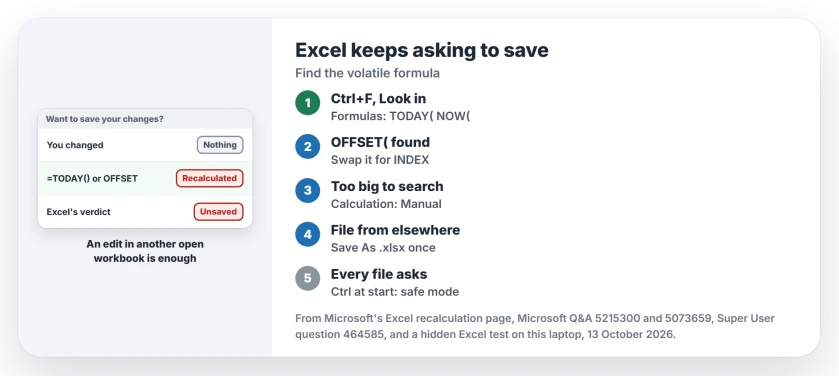
Status: tested 13 October 2026 in Excel 16.0 on Windows 11 25H2. A volatile formula turns the file unsaved at the next recalculation, even one you start in another workbook.
Ours: a hidden Excel 16.0, build 20430, ran four volatile files and three without volatile formulas on this laptop. All of them opened clean. One recalculation later, the four volatile ones were marked unsaved.
The surprise was the second test. Typing one number into a different open workbook did the same to the TODAY, OFFSET and INDIRECT files, while the SUM and INDEX files stayed clean.
So the prompt can follow you even when you never touched the file.
Microsoft's note on the Saved property says it plainly too: "Various conditions in your worksheet, such as the presence of volatile functions, might affect the Saved property".
1. Find the volatile formula and replace it
Press Ctrl+F, click Options, and set Look in to Formulas. Search for TODAY( first, then NOW(, OFFSET( and INDIRECT(. Find All lists every cell at once.
Confirmed by an owner on that 100+ thread in September 2023: "Removing all the TODAY() functions in my formulas fix this issue".
If the date only needs to be today's date when you type it, enter it as a fixed value instead. Ctrl and the semicolon key type the current date into a cell, and it never recalculates.
OFFSET usually has a quiet twin. INDEX is not on Microsoft's volatile list, and in my test the INDEX version of the same total stayed clean after every recalculation:
Volatile:  =SUM(OFFSET(B1,0,0,3,1))
Clean:     =SUM(B1:INDEX(B1:B10,3))
One Super User commenter put the difference this way: "A workbook with only non-volatile formulae will not prompt to save changes when none were made, even if automatic calculation is on".
2. Or keep the formulas and switch to Manual
On the Formulas tab, open Calculation Options and pick Manual. Excel then recalculates only when you press F9.
One owner took this route on a workbook too big to search: "In Formulas, Calculation Options, set to Manual. This worked on a large file of mine with about 50 tabs".
In my hidden Excel, the TODAY, OFFSET and RAND files all stayed saved under Manual, even after an edit elsewhere. The cost is real, though. Manual applies to every workbook open in that Excel, so your totals stay stale until you press F9.
If that mode was left on and the numbers stopped following edits, restore recalculation before trusting the totals.
3. A file from someone else, or from an older Excel
Another cause sits in a list that a Super User answer copied from Microsoft's old support article: "The file has been opened in a newer version and formulas have been calculated".
The same owner who used Manual had a fix for those files too: "For an older version xls or xlsx file, Save as xlsx and over-write the file. This almost always kills it with files I get from others".
That list carried a few more triggers. It names "Linked pictures", "Iterative formulas" and "VBA code that updates the workbook".
If your workbook has pivot tables, check them too. One owner turned off the PivotTable option called Refresh data when opening the file and wrote "Unchecking that option for each PivotTable solved the issue".
Every workbook asks, even a blank one?
Then your file is not the cause. On a Q&A thread marked 50+, a blank workbook saved and closed still asked again, even after a clean Windows reinstall.
The adviser's test was to "hold the Ctrl key when starting excel itself, to force safe mode". If safe mode stays quiet, the adviser's next line applies: "If no save prompt, then you need to reveal what com add-ins are listed".
Reported by an owner on Super User: an unused MySQL for Excel add-in caused it. "Because I wasn't actually using this component, I went to the MySQL Installer and removed it". The prompts stopped. If you never use an add-in, remove it too.
A December 2024 asker had another clue: "every time I close Excel, it prompts me to save my personal.xls even though no changes have been made to it".
That hidden file opens with Excel. If your Excel also leaves a stray blank window behind, we traced what opens it.
A 2025 owner on that thread said it "Started immediately after Office 365 update" on every file, empty ones included. No fix was posted. Test safe mode first.
If Word asks you for Save As on every save, that is a different loop with its own causes. We covered it in Word stuck in a Save As loop.
The Short Version
- Ctrl+F, Options, Look in: Formulas. Search TODAY(, NOW(, OFFSET( and INDIRECT(.
- Swap OFFSET for INDEX, and type fixed dates instead of TODAY.
- Big workbook? Formulas, Calculation Options, Manual, then F9 when you need totals.
- A file from someone else: Save As .xlsx over it once.
- Every file, even blank ones: start Excel with Ctrl held and test your add-ins.
Where to Next
Which formula or add-in was behind your prompt? Leave it in the comments; each new cause goes into step 3 with your report.

Isaac Smith is the founder and editor of PC Glance, a website that covers computers, laptops, and technology. He is a tech enthusiast and a computer geek who loves to share his insights and help his readers make smart choices when buying tech gadgets or laptops. He is always curious and updated about the latest tech trends.