
The quickest way to identify a Samsung phone is Settings > About phone. Copy the product name and the complete model number. The name tells you the Galaxy family; the model code gives you the specific version.
If the phone won't unlock or turn on, use its printed markings, original box, or an existing device record. Don't guess from the camera arrangement.
Read the model fields in Settings
Unlock your phone and open Settings. Scroll to About phone, then look for Product name, Model name, or Model number. The labels vary with your Galaxy model and software version.
Write down the complete code, including its final letters. On many Galaxy phones it starts with SM-. Don't stop at the Galaxy S, A, Z, or Note family name when requesting a replacement part or model-specific instructions.
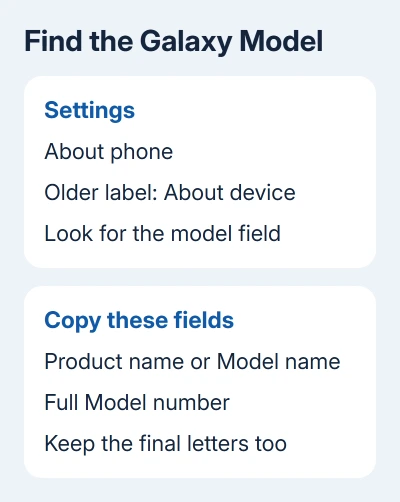
Samsung lists this menu in its device-identification instructions. On older phones, look for About device; some identification details may be inside Status.
If scrolling through Settings is awkward, use its search box for About phone. Open the matching settings result and read the model field there, rather than relying on a name shown in a Bluetooth list.
A previous owner can change the device name. For a secondhand phone, use the product and model fields instead.
Copy the right identifier for the job
Several phones can share a model number. A serial number identifies your individual phone, while an IMEI identifies it to mobile networks.
That distinction matters when asking for help. A repairer needs the model to find compatible parts; your carrier may need the IMEI for a network or account issue. Use the number they ask for.
On a dual-SIM phone, more than one IMEI may appear. That doesn't mean the phone has two different Galaxy models. Read the separate model field instead of choosing one of those longer numbers.
Keep IMEI and serial numbers out of public posts. If sharing a screenshot for model advice, crop it to the product name and model number, leaving phone numbers and personal identifiers out.
For a software problem, record the software version separately through Settings > About phone > Software information. Android and One UI versions can change after updates; the hardware model stays the same.
Use Samsung Members when it already knows the device
Open Samsung Members, select Support, then tap the device-name entry. Check the device details for the model information you need.
Older Members versions may label the section Get help. For a previously registered product, open that section and select the phone's model entry to view its details.
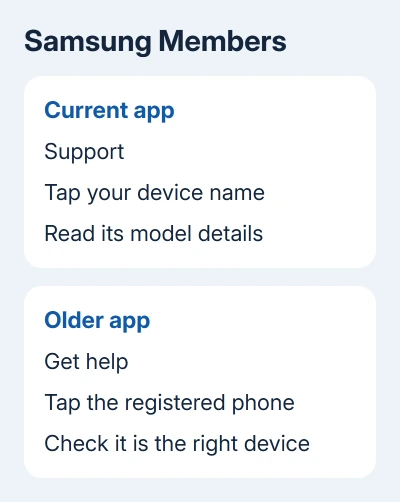
If Members lists several registered products, check which one you've selected. An older phone's record can look familiar without being the handset you're checking.
Members is useful if you've already set it up. Otherwise, About phone is quicker.
The Samsung phone-location options apply when the handset itself is missing. Check that any device record you use belongs to the missing phone.
Check the phone and its box when the screen won't open
Remove an ordinary protective case and inspect the small print on the phone's back. Depending on the model, the model number may be printed there. Read the label in good light or magnify it with another phone's camera.
If the back doesn't show it, check the original retail packaging for the product and model information. Make sure the box belongs to this handset, particularly when several phones are stored together.
Some older phones and selected rugged models have identification under a removable battery. Only use that route when the battery is designed to come out. Don't pry open the sealed back of a modern Galaxy.
If the screen is black but the phone still responds, the Samsung frozen-phone restart steps may restore access to Settings. Read the hardware label first if a restart isn't practical.
Don't mistake the dial code for a model lookup
Opening the Phone keypad and entering *#06# can display the IMEI and serial number. It doesn't replace the model-number field, and carrier support for the code varies.
If that screen gives you only long numeric identifiers, return to About phone or use the printed information. Read the model code from the phone instead of entering your IMEI on an unknown website.
When neither Settings nor a matching label is available, contact Samsung Support for your region. Give them the identifiers privately and request confirmation of the exact model before ordering a part or arranging service.
The Short Version
Copy the complete model code from About phone. Samsung Members, the phone's printed label, and its original packaging are alternatives. Distinguish that code from your IMEI, serial number, and editable device name.
Checked November 7, 2026.

Isaac Smith is the founder and editor of PC Glance, a website that covers computers, laptops, and technology. He is a tech enthusiast and a computer geek who loves to share his insights and help his readers make smart choices when buying tech gadgets or laptops. He is always curious and updated about the latest tech trends.