
Your iPhone moved to iOS 27, but Software Update on your iPad offers iPadOS 26.7 or says it is up to date. On an older iPad, that is Apple's model list at work, not a broken update.
I checked Apple's own list of iPads that run iPadOS 27. I also went through a thread in which three volunteers answered an iPad 8th generation owner within half an hour.
An iPad 8 that would not update
The owner's post was short: "Can't update IPad 8th generation MYL92B/A to new OS". The first reply came fast: "Your iPad is too old for iPadOS27".
A Level 10 volunteer then set out the limit: "An iPad8 can be updated to iPadOS 26.x". They named iPadOS 26.7 as the newest release for it.
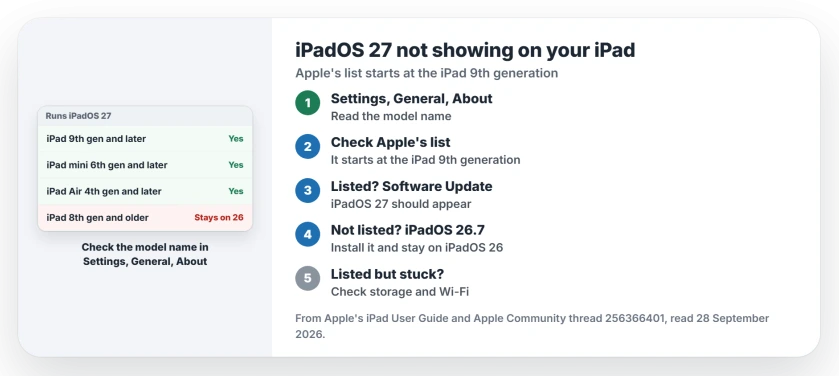
Status: iPadOS 27, checked 28 September 2026. Apple's list starts at the iPad (9th generation), iPad mini (6th generation) and iPad Air (4th generation). Older iPads stay on iPadOS 26.
1. Find your iPad's model name
Apple says to check it in Settings: "Go to Settings > General > About." The model name is near the top of that screen.
If the name does not settle it, Apple has a page for identifying your iPad model from the details on the case.
2. Compare it with Apple's list
Apple's iPadOS 27 page introduces iPadOS 27, "which is compatible with the following models". In short:
- iPad (9th generation), iPad (10th generation) and iPad (A16)
- iPad mini (6th generation) and iPad mini (A17 Pro)
- iPad Air (4th and 5th generation), and the M2, M3 and M4 models
- iPad Pro 11-inch from the 2nd generation, including M4 and M5
- iPad Pro 12.9-inch from the 4th generation, and iPad Pro 13-inch
Any iPad on that list should see iPadOS 27 in Software Update.
3. Not on the list? Stay on iPadOS 26
The same volunteer listed which older iPads stop at iPadOS 26.7, so that limit is user-reported rather than Apple's wording.
Besides the iPad 8, their list includes the iPad Air (3rd generation), iPad mini (5th generation), the first 11-inch iPad Pro and the 3rd generation 12.9-inch iPad Pro.
Apple says: "To update your iPad to the latest iPadOS software compatible with your model, go to Settings > General > Software Update." On those iPads, that means iPadOS 26.7. I would install it rather than wait for 27.
4. On the list, but still nothing?
If your model is listed and iPadOS 27 never appears, check free storage and your Wi-Fi first. That step is ours, since the thread's owner had an older iPad.
If the update appears but will not finish, you can also install it from a computer. The update verification page covers that route, including Apple's app for Windows.
Other update problems
If it is a Mac that will not offer macOS 27, the macOS 27 page explains why Intel Macs cannot get it. And if an iPhone update says it is temporarily unavailable, that page works through the causes in order.
Can the iPad 8th generation get iPadOS 27?
No. Apple's list starts at the iPad (9th generation). A Level 10 volunteer names iPadOS 26.7 as the iPad 8's last version.
Which iPads support iPadOS 27?
The iPad from the 9th generation, the iPad mini from the 6th, the iPad Air from the 4th, and the iPad Pro 11-inch and 12.9-inch from 2020 models onward, plus every newer M-series model.
How do I check which iPad I have?
Open Settings, then General, then About, and read the model name. Apple's identify page helps if that is not enough.
Why does my iPhone have iOS 27 but my iPad does not?
Each device has its own list. A newer iPhone can run iOS 27 while an older iPad stays on iPadOS 26; that explanation is ours.
The Short Version
- iPadOS 27 is not on every iPad.
- Settings, General, About shows your model.
- The list starts at the iPad 9th generation.
- iPad 8 and older stop at iPadOS 26.7.
- Install the newest update you are offered.
- Listed but stuck? Check storage and Wi-Fi.
Where to Next
Check the model under Settings, General, About now, then hold it against Apple's list. Install whatever Software Update offers you.
If your model is listed and iPadOS 27 still does not appear, name it in a comment. I will compare it with Apple's list and the owner reports.

Isaac Smith is the founder and editor of PC Glance, a website that covers computers, laptops, and technology. He is a tech enthusiast and a computer geek who loves to share his insights and help his readers make smart choices when buying tech gadgets or laptops. He is always curious and updated about the latest tech trends.