
Your iPhone is on iOS 27, but your Mac still sits on macOS Tahoe and Software Update offers nothing newer. On a Mac with an Intel processor, that is how it should look.
I checked Apple's compatibility list for macOS 27 Golden Gate, published 14 September 2026. I also read a thread where four senior volunteers answered this exact question.
The iPhone updated, the Mac did not
An owner with a 13-inch MacBook Pro on macOS 26.6.2 asked it plainly: "my iPhone has been updated with OS 27.0 but my MacBook is not updating to version 27.0".
A Level 9 volunteer explained that the two update separately. Two Level 10 volunteers added that macOS 27 needs Apple silicon, and a fourth said no Intel Mac received it.
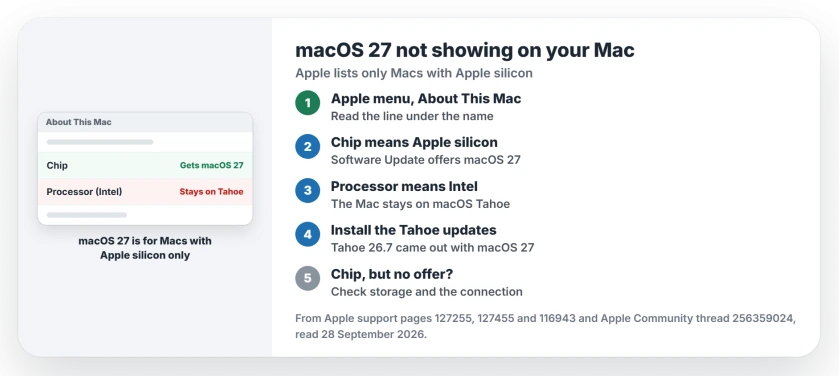
Status: macOS 27 Golden Gate, checked 28 September 2026. Apple lists only Macs with Apple silicon. An Intel Mac stays on macOS Tahoe or older, so macOS 27 never appears in its Software Update.
1. Look for Chip or Processor
Choose Apple menu, then About This Mac, where one word settles it.
Apple documents the difference on its Apple silicon page. On an Apple silicon Mac, "About This Mac shows an item labeled Chip". On an Intel Mac, you see "an item labeled Processor, followed by the name of an Intel processor".
2. Apple silicon only, in Apple's words
Apple says in its upgrade page: "macOS 27 is compatible with any Mac with Apple silicon, which includes any Mac with an M-series chip or A-series chip."
The same page explains why nothing appears on an Intel Mac. Apple says Software Update "offers only updates that are compatible with your Mac".
The oldest Macs on Apple's compatibility list are the first M1 models, from 2020 and 2021. The MacBook Neo is on it too. Its chip is the A18 Pro.
3. On an Intel Mac, keep Tahoe up to date
Apple's compatibility list adds that if your Mac is not compatible, "you might be able to install an earlier version of macOS instead". For an Intel Mac, that means macOS Tahoe.
Apple released macOS Tahoe 26.7 the same day as macOS 27, a Level 10 volunteer noted, so a Mac on 26.6.2 should check for it.
Install the Tahoe updates Software Update offers you. I would not chase macOS 27 on an Intel Mac any further.
Not every Intel Mac got Tahoe either. Apple's Tahoe list names only four Intel models: the 16-inch MacBook Pro (2019), the 13-inch MacBook Pro (2020, Four Thunderbolt 3 ports), the 27-inch iMac (2020) and the Mac Pro (2019).
Other Intel Macs stay on Sequoia. When an owner's 2020 MacBook Air would not update past 15.8, a Level 10 volunteer said the Intel model "is not compatible with macOS Tahoe 26 or macOS 27".
A Level 9 volunteer was blunter: "macOS 15.* (Sequoia) is the end of the line". Check About This Mac first, since the M1 MacBook Air from the same year does get macOS 27.
4. Apple silicon, and still nothing offered?
If About This Mac says Chip and macOS 27 still does not appear, the same volunteer suggested checking free storage and your internet connection first.
They also suggested asking Terminal which full installers Apple offers your Mac, with the command softwareupdate --list-full-installers. That lists them without installing anything; that note is ours.
Other Mac update and sharing problems
If macOS Tahoe 26.7 will not show up either, the Tahoe 26.7 page starts with the Safari update that blocks it. And if your Intel Mac shares files with a Mac on macOS 27, the file sharing page covers what works between them.
On an iPad, the same kind of list decides iPadOS 27, and the iPadOS 27 page shows which models get it.
If you did upgrade an Apple silicon Mac and want Sequoia back, the downgrade page covers the backup, the USB installer and the erase.
Why is my Mac not getting macOS 27?
Apple lists only Macs with Apple silicon. If About This Mac shows Processor rather than Chip, your Mac is Intel-based and stays on macOS Tahoe, or on Sequoia if Apple's Tahoe list leaves it out.
Can an Intel Mac run macOS 27?
Not according to Apple's list, where every model has an M-series or A-series chip.
Does my Mac have to match my iPhone's version?
No. A Level 9 volunteer pointed out that iPhone and Mac updates are separate, so an iPhone on iOS 27 can sit beside a Mac on Tahoe.
Which is the oldest Mac that gets macOS 27?
Apple's list goes back to the M1 models: the MacBook Air (M1, 2020), the 13-inch MacBook Pro (M1, 2020), the Mac mini (M1, 2020) and the 24-inch iMac (M1, 2021).
The Short Version
- macOS 27 needs Apple silicon.
- About This Mac shows Chip or Processor.
- Processor with Intel means no macOS 27.
- Intel Macs stay on Tahoe or Sequoia.
- Keep installing the Tahoe updates.
- Apple silicon but no offer? Check storage.
Where to Next
Check About This Mac now, and read the line under the Mac's name. If it says Chip, open Software Update and install macOS 27.
If your Mac shows Chip and Software Update still offers nothing, post the model in a comment, and I will look it up on Apple's list.

Isaac Smith is the founder and editor of PC Glance, a website that covers computers, laptops, and technology. He is a tech enthusiast and a computer geek who loves to share his insights and help his readers make smart choices when buying tech gadgets or laptops. He is always curious and updated about the latest tech trends.