
An iPhone that's not receiving text messages may have received them without an alert. Open Messages and search for the sender first, then check whether a missing text uses iMessage or your carrier before resetting anything.
Blue iMessages need an internet connection and the right receiving address. SMS, MMS and RCS depend on your carrier's messaging service. One type can work while another fails.
1. Look for the message inside Messages
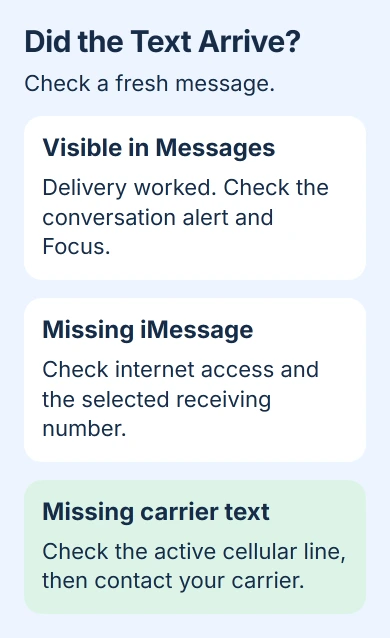
Ask someone to send a fresh message while you watch the conversation list. Search for their name or number. If you can see the message but your phone stayed quiet, check notification settings instead of changing your SIM.
Apple says to check the connection and receiving number in its message troubleshooting. Use a new message for each test so you can tell whether a changed setting helped.
In current versions of Messages, open the conversation list's Filter menu and check Unknown Senders. For someone you recognize, open their conversation and use Mark as Known, or save their number in Contacts.
Check Spam too, if that folder is available. For a legitimate message placed there, open it and choose Not Spam > Move to Messages. The message-filter controls vary by software and region.
If you can see the message but didn't get an alert, check Settings > Notifications > Messages > Allow Notifications and your active Focus. For one silent conversation, use the single-person notification checks.
2. Compare an iMessage with a carrier text
Ask an iPhone contact to send a new iMessage to your phone number. Then ask someone to send a carrier message to that same number. Check what their phone actually sent, since a green bubble can mean RCS, SMS or MMS.
If blue messages arrive but carrier texts don't, focus on the cellular line and carrier support. If carrier texts arrive but iMessages don't, check your internet connection and iMessage registration in the next steps.
If neither arrives, check your phone's service indicator and try loading a webpage. Your browser can work over Wi-Fi while your cellular line isn't connected to the carrier. SMS can still fail in that situation.
I'd try both message types before changing account settings. You'll have a specific message type to report to support, instead of saying all messaging is broken.
A bank code and a group with Android users aren't ideal first tests. Each has extra delivery rules. If only bank codes fail, use the verification-code delivery guide rather than treating missing codes as an iMessage problem.
3. Restore the connection used by the missing messages
Restart the iPhone, then ask for another message of the type that failed. Check whether that new message arrives, rather than judging the result by whether an old missing one eventually appears.
For iMessage, connect to working Wi-Fi or cellular data and load a new page. If one Wi-Fi network fails, try cellular data. This helps you check the connection before moving on to your receiving address.
For SMS, check that your phone has carrier service. If it shows SOS or No Service, check the cellular connection first. Wi-Fi Calling can carry SMS on supported service, but ordinary Wi-Fi alone doesn't do that.
On a dual-SIM phone, open Settings > Cellular, select the line for the number people are texting, and make sure it's turned on. A second working line doesn't restore messages addressed to the inactive number.
After transferring your number or getting a new eSIM, ask the carrier whether incoming messaging has finished moving to the new line. Keep the eSIM installed while they check; removing it can mean you need another activation.
4. Select your number in iMessage receiving settings
Open Settings > Apps > Messages > Send & Receive. On iOS 17 and earlier, Messages sits directly in Settings. Check the receiving section and select the phone number people are using.
If only an email address is selected, messages can appear on an iPad while texts to your number don't reach the iPhone. Ask the sender to start a new conversation addressed to your phone number, then check whether it arrives.
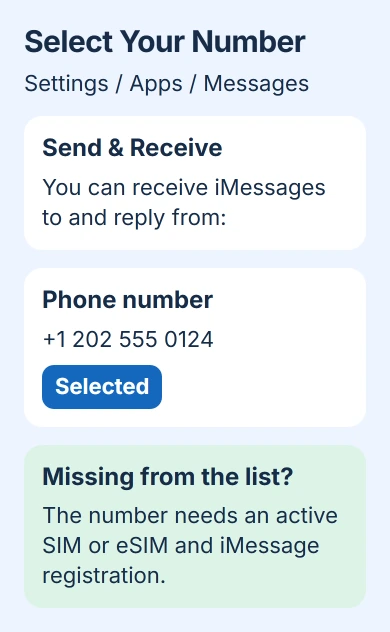
The phone-number setup requirements include an active SIM or eSIM associated with that number. Typing a number into a contact card doesn't register it with iMessage.
If this started after moving to another iPhone, install any available iOS update. Then turn iMessage off and on in Messages settings, and check Send & Receive again.
If your number is missing, you can't select it, or you see Waiting for Activation, iMessage still needs to register your number. Follow the help for that activation error or contact support instead of repeatedly flipping the switch.
5. Check a blocked sender or a wrong destination
If only one person can't reach you, ask them to read back the number they're texting. Their conversation can still use an old work number or Apple Account email even after they change your contact card.
For a recipient who moved to Android, remove the old iMessage number registration before treating missing carrier texts as an iPhone alert problem.
Have them compose a new message to the correct number. Keep the old conversation for its history. Deleting your copy doesn't correct an address saved on the sender's phone.
If that old conversation was already removed, review the iMessage retrieval routes while its recent deletion may still be recoverable.
On iOS 26 and later, review Settings > Privacy & Security > Blocked Contacts. Unblock the intended number if it's there. Older releases keep messaging blocks under Settings > Apps > Messages > Blocked Contacts, or directly under Messages.
The blocking and spam instructions explain that messages from blocked contacts aren't delivered. Once you've unblocked the sender, ask them to send a new test message.
6. Report the failed type of message
If SMS, MMS or RCS still won't arrive, give your carrier the affected number, message type and test time. Report whether you can make calls and send texts, plus any SIM change or number transfer before the problem began.
If iMessage fails with working internet and the right number selected, contact Apple Support. Share the activation message and say whether another address works. Ask them to check your number's registration rather than alert sounds.
If only one group fails, ask someone in it to check that you're still included. Being left out of a group needs a different fix from missing individual messages. Keep your phone's data while you check either problem.
The Short Version
Find out whether the text is hidden, silent or missing. Compare iMessage with carrier delivery, check the cellular line and receiving number, then review blocked senders. Tell support which message type still fails.
Checked November 5, 2026.

Isaac Smith is the founder and editor of PC Glance, a website that covers computers, laptops, and technology. He is a tech enthusiast and a computer geek who loves to share his insights and help his readers make smart choices when buying tech gadgets or laptops. He is always curious and updated about the latest tech trends.