
You send a green bubble text from your Mac, and Messages marks it Not Delivered. Then your friend answers it, so it clearly arrived.
It is annoying and confusing, and for some owners it began with the macOS 27 update. I read a MacRumors thread where one owner fixed it on the iPhone, plus Apple's pages on how your Mac sends texts.
Why the Mac is the one that looks wrong
Your Mac does not send RCS texts by itself. Apple's Mac guide says you can "relay phone calls and text messages through your iPhone to your Mac", so every green bubble on the Mac travels through the phone.
That is how the two screens can disagree. An owner with a MacBook Air wrote that "RCS messages are showing as Not Delivered, yet recipients are receiving the messages without delay".
Their iPhone had it right: "On my iPhone iOS27 the same messages show normally as Delivered/Read." The first poster, on a Mac mini, could not send RCS texts from the Mac at all.
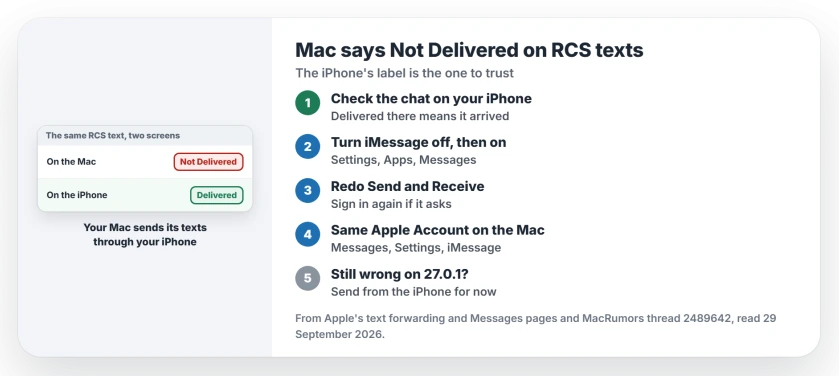
Status: macOS 27.0.1 and iOS 27.0.1, checked 29 September 2026. One owner fixed it on the iPhone's Send and Receive screen. Another says 27.0.1 alone did not fix it.
1. Check the same chat on your iPhone
Before you change any settings, open the conversation on your iPhone. If it says Delivered there, your text arrived and only the Mac's label is off.
The Delivered label comes from RCS itself, which Apple says "supports delivery receipts, read receipts and typing indicators". On the iPhone, those receipts kept working for owners in the thread.
A reply there suggested one clean test: "I'd test a new thread to one Android contact and compare the Mac/iPhone status before changing iCloud settings again." It shows whether every RCS chat is hit, or only one.
2. Redo Send and Receive on the iPhone
The fix is confirmed by an owner, the first poster, later that same day. In their words: "You have to go through the registration process again and force the sync with iCloud." Their Mac then sent RCS texts again.
They found it under Settings, Apps, Messages, Send & Receive. Apple's forwarding page gives a matching routine for a Mac missing from the list: "turn iMessage off and back on, then tap Send & Receive and sign in again."
So, on your iPhone:
- Open Settings, tap Apps, then tap Messages.
- Turn iMessage off, wait a few seconds, then turn it back on.
- Tap Send & Receive, and sign in again if it asks.
- Check that your phone number starts new conversations.
Reactivation can take a while, and if iMessage hangs on waiting for activation, our iMessage activation page covers that part.
3. Sign the Mac in with your iPhone's account
Apple is strict here: for texts on your Mac, both devices need one Apple Account, and you must "be using iMessage on your iPhone and Mac."
On the Mac, open Messages, choose Messages, then Settings, and click iMessage. The account shown must match your iPhone's. If not, Apple's advice is short: "click Sign Out, then sign in with the correct Apple Account."
One owner had already switched Enable Messages in iCloud off and on at the Mac, with no change. I would start on the iPhone for that reason.
If signing in there fails outright, or Sign Out never finishes, the Mac iMessage sign-in page deals with that first.
4. Switch the Mac on in Text Message Forwarding
Without Messages in iCloud, your iPhone keeps a list of devices allowed to send its texts. Open Settings, Apps, Messages, then Text Message Forwarding, and switch your Mac on.
With Messages in iCloud, Apple says forwarding "is always on for each of your devices that is using Messages in iCloud". So this list only matters when Messages in iCloud is off.
5. If 27.0.1 did not fix it
Apple's note for macOS 27.0.1 says only: "This update provides bug fixes for your Mac." It names no Messages fix.
On 29 September one owner wrote that it "still hasn't been resolved with macOS 27.0.1 (along with iOS 27.0.1)". They did not say whether they had tried the Send & Receive step.
Until a later update settles it, I would trust your iPhone's label. Send anything that matters from the phone itself.
When texts really do not arrive
If the other person never gets your text, you have a different problem. Our texts to Android page works through real send failures from a Mac, iPad or Apple Watch.
If Messages on your Mac shows initials instead of contact photos, the contact photos page has the fixes owners found.
Why does my Mac say Not Delivered when the message arrived?
Your Mac sends RCS texts through your iPhone. In the thread, the iPhone showed Delivered for the same texts, so the Mac's label was the one out of step.
Does macOS 27.0.1 fix Not Delivered on RCS texts?
Not for one owner who updated both the Mac and the iPhone. Apple's note for 27.0.1 lists no single fix.
Can my Mac send RCS messages without my iPhone?
No. Apple's forwarding page asks for an iPhone that is turned on, connected to Wi-Fi or cellular, and able to send and receive messages.
The Short Version
- Your Mac sends RCS texts through your iPhone.
- Check the chat on the iPhone first.
- Delivered there means the text arrived.
- On the iPhone, switch iMessage off, then on.
- Tap Send & Receive and sign in again.
- Match the Apple Account on the Mac.
- 27.0.1 alone did not fix it for one owner.
Where to Next
Redo Send & Receive on your iPhone now, then send one test text from the Mac to an Android contact. Compare both screens after it goes.
If your Mac still says Not Delivered after all of this, leave a comment with your macOS build. A fix goes on this page once an owner confirms it.

Isaac Smith is the founder and editor of PC Glance, a website that covers computers, laptops, and technology. He is a tech enthusiast and a computer geek who loves to share his insights and help his readers make smart choices when buying tech gadgets or laptops. He is always curious and updated about the latest tech trends.