
An Outlook account can receive and send mail through the Gmail app on Android or iPhone. Add it as another email account and sign in with Microsoft. Signing into the Gmail website with an Outlook address does not open that Outlook mailbox.
The distinction is between Gmail as a phone app and Gmail as Google's email service. Adding Outlook to the app keeps the Outlook address and mailbox separate from any Gmail account already there.
Add Outlook to the Gmail phone app
Adding an Outlook mailbox through this account menu is documented by Google. Keep access to the Microsoft verification method for that account, since sign-in may require a code or approval.
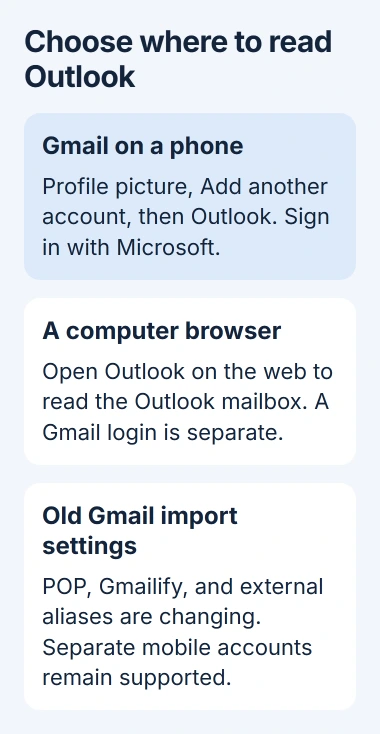
Status: checked November 3, 2026. Gmail supports separate Outlook accounts in its mobile app. Google's January 2027 Gmailify, POP, and third-party alias changes do not remove that mobile access.
- Open Gmail on the phone and tap the profile picture in the top-right corner.
- Tap Add another account.
- Choose the Outlook provider option for a personal Outlook.com, Hotmail, or Live address.
- Enter the Microsoft account address and follow its sign-in and permission screens.
- Return to Gmail and select the added account from the profile menu.
These are the Android account steps; Google publishes the same account-menu route for iPhone and iPad. Provider labels can vary with the app version.
A work or school mailbox may use a different account type or block third-party mail apps. Follow the provider option for that account and the organization's instructions if the personal Outlook option is rejected.
Check the selected address before composing. Send a test message and reply from the receiving account to verify mail in both directions.
Read both inboxes without merging accounts
Google says All inboxes in Gmail's menu displays mail from the accounts added to the app. Selecting one address from the profile menu returns to that account's own inbox.
This combined view does not convert Outlook mail into a Gmail address. Use the account selector when a message appears missing, particularly before changing settings for Gmail not updating on an iPhone.
Removing a mailbox from one mail app also does not sign it out of another. The Outlook sign-out guide explains the separate app and browser sessions if moving away from Microsoft's app.
On a computer, use Outlook on the web
Google's computer instructions say Outlook accounts cannot be added through Gmail's external-account setup because Microsoft requires modern authentication. Repeatedly changing a working Microsoft password will not change that limitation.
Open Outlook on the web for a personal mailbox, or the organization's Outlook site for a work account. The Gmail mobile app remains an option for reading the same Outlook mailbox on a phone.
Forwarding incoming messages is a different arrangement. It does not give Gmail the original Outlook account's folders or the same direct sending connection as adding the account to the mobile app.
What changes in January 2027
Google states that Gmailify and POP fetching are being removed. It also lists the removal of third-party Send mail as aliases, with the transition affecting new setups before January 2027.
That alias feature sends from an external address while using a Gmail account. It is separate from selecting a directly connected Outlook account in the Gmail mobile app.
Google's notice explicitly says mobile access to separately added third-party accounts continues. Previously imported mail stays in Gmail, but an old web import setup is not the route for connecting a new Outlook account.
If Microsoft sign-in is refused
Try signing into the account on Microsoft's own website. A failure there belongs with Microsoft account recovery or the work administrator. If the website works, note the exact Gmail sign-in error and contact Google or the administrator.
Do not bypass a work account's access policy or replace a provider sign-in with an unverified password workaround. The error message determines whether the next step concerns the account, the app, or organization permissions.
The Short Version
Yes, add Outlook through Gmail app, profile picture, Add another account on a phone. For computer access, use Outlook on the web. Gmail's ending import and alias features are separate from its mobile account support.

Isaac Smith is the founder and editor of PC Glance, a website that covers computers, laptops, and technology. He is a tech enthusiast and a computer geek who loves to share his insights and help his readers make smart choices when buying tech gadgets or laptops. He is always curious and updated about the latest tech trends.