

You are typing an email on your Mac, and suddenly nothing lands. The window and menu bar still look normal. But every key you press goes nowhere. It stays that way in every app until you restart or log out.
It is annoying when it happens in the middle of work, and it keeps coming back. Owners have a name for it, the phantom focus bug, and several found what caused it on their Mac.
I will start with the trick that gets your typing back in seconds, then the causes, the likeliest first.
What is going on
The first poster summed it up as "Active window suddenly loses focus". The keyboard is fine. macOS has handed your typing to a window that is not there.
The thread has 81 Me too votes since January, and owners report it on Sequoia, on Tahoe from 26.2 to 26.5.2, and on macOS 27 Golden Gate.
One noticed a pattern: "I seem to encounter the bug only after the machine comes back from sleep".
The volunteers who answer these threads all pointed the same way. One Level 9 member put it like this: "Most issues are caused by third party installed software". The fixes owners found agree with that.
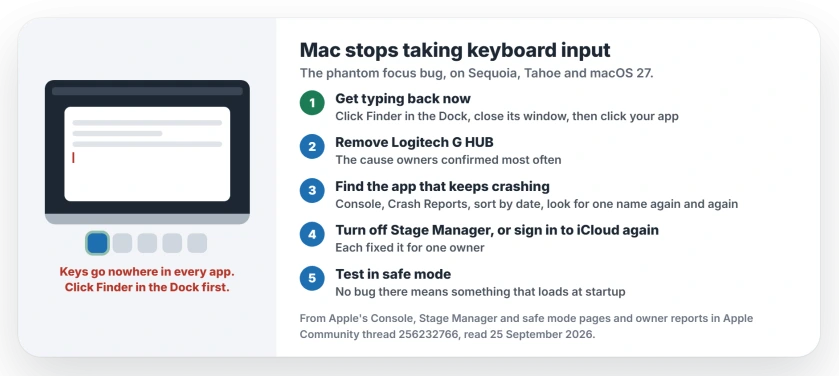
Status: macOS Sequoia, Tahoe and macOS 27, checked 25 September 2026. Apple has not acknowledged it. Owners fixed it by removing Logitech G HUB or an app that kept crashing.
1. Get your typing back right now
A Level 10 volunteer shared the quickest way out. Click the Finder icon in the Dock, close the Finder window that opens, then click back into the app you were using. In their words: "That restores the Focus for all apps".
I think it works because clicking Finder hands the focus to a real window again. If it fails, log out and back in, or restart.
That only gets you through today, though. To stop it coming back, work through the rest.
2. Remove Logitech G HUB
This is the cause owners confirmed most often. If you use a Logitech mouse or headset, check your Applications folder for G HUB.
One owner removed it and reported "I have NOT encountered this issue ever since", more than two months later, while another removed it on Tahoe 26.3.1 and wrote that "the issue has not presented itself since then".
You can keep the Logitech hardware. The second owner only needed G HUB for updates, and did those from a phone instead.
Not everyone with this bug has Logitech software, though. One owner wrote: "I'm in 26.4.1 (25E253) and this is still happening. I have no Logitech stuff". If that is you too, move on.
3. Find the app that keeps crashing
Two owners found a different culprit, a background app that crashed over and over, and one of them was already on macOS 27 Golden Gate.
Open Console, which you can find with Spotlight. Apple's Console guide says Crash Reports holds "System and user reports about apps or processes that crash".
Choose Crash Reports, then sort by date. Look for one name that shows up again and again, minutes or seconds apart.
The Golden Gate owner did exactly that.
"I used the Crash Reports and found some things that kept crashing. I removed them one by one and restarted to make sure it was the cause". Their culprit was a monitoring utility: "My issue was a Techtool Monitor that was causing pain".
The other owner got the same result with a different app: "I found the app that keeps crashing, uninstalled it and managed to fix the issue". Before you uninstall anything, check whether a newer version supports your macOS.
4. Turn off Stage Manager
One owner fixed it by turning off Stage Manager, at least for a while. It is quick to test. I would rule it out before anything bigger.
Apple's steps on macOS 27: open System Settings, click Desktop & Dock, go to Desktop & Stage Manager, then turn Stage Manager off.
5. Sign out of iCloud, then sign in again
An owner on Tahoe 26.5.2 blamed iCloud. They had just stopped syncing that Mac with iCloud Photos, and a background process seemed stuck on it.
Their fix: "I signed out of iCloud completely, then signed back in. The issue has not returned since". Let iCloud finish syncing before you sign out, so nothing is left half uploaded.
6. Test in safe mode
If none of the steps so far found it, safe mode can tell you whether third-party software is involved at all. Apple says safe mode "Prevents certain software from loading as your Mac starts up", including login items and extensions.
Use your Mac in safe mode for as long as the bug usually takes to appear. If it never shows up, something that loads at startup is the cause. Then remove login items one at a time.
7. Tell Apple
The same Level 10 volunteer suggested sending it to Apple through the macOS feedback page. Mention your macOS version, any mouse or keyboard software you run, and whether it starts after sleep.
Other Mac input problems
If your Bluetooth keyboard drops out or will not connect, you have a different problem, and the Tahoe keyboard and mouse fixes deal with it.
If Mission Control or desktop switching broke with macOS 27 instead, that has its own fixes.
And if Finder's column view stopped scrolling to your folders on Tahoe, that is a separate bug with its own workaround.
Why does my Mac keyboard suddenly stop working in every app?
Most often because macOS has moved the focus to a window you cannot see. Owners traced it to Logitech G HUB, to an app that kept crashing, to Stage Manager, or to a stuck iCloud process.
How do I get my Mac keyboard working again without restarting?
Click the Finder icon in the Dock, close the Finder window, then click back into your app. A Level 10 volunteer says that restores the focus for all apps.
Is Logitech G HUB causing my Mac keyboard to stop working?
It was for several owners, who stopped seeing the bug after removing it. It is not the only cause, since one owner with no Logitech software had the same problem.
Does the phantom focus bug happen on macOS 27?
Yes. One owner on macOS 27 Golden Gate had it, and fixed it by removing an app that kept crashing.
The Short Version
- Your keyboard is fine. macOS has handed your typing to an invisible window.
- Click Finder in the Dock, close its window, and your typing comes back.
- Remove Logitech G HUB if you have it.
- Check Console's Crash Reports for an app that crashes again and again.
- Turn off Stage Manager, or sign out of iCloud and in again.
- Safe mode tells you whether third-party software is to blame.
Where to Next
Keep the Finder trick in mind for the next time it happens. Then check Applications for G HUB tonight.
If you find a different culprit in Console, leave its name in the comments. Every app name owners share makes this easier for the next person.

Isaac Smith is the founder and editor of PC Glance, a website that covers computers, laptops, and technology. He is a tech enthusiast and a computer geek who loves to share his insights and help his readers make smart choices when buying tech gadgets or laptops. He is always curious and updated about the latest tech trends.