
You install Ubuntu or another distro for the Windows Subsystem for Linux, and it stops at WslRegisterDistribution failed with error 0x80370114.
The second line says a required feature is not installed, then asks you to press any key. Yet every box you can find looks ticked.
I would start with Windows Update and a plain restart, before any settings or commands. It sounds too simple. It is what cleared the error for the person who asked the larger of two big questions, after hours of other attempts.
Two Super User questions about this one error have 229,756 and 214,386 views between them, both from 2022. Answers and confirmations kept coming through 2025.
What the error is pointing at
The full message reads "The operation could not be started because a required feature is not installed".
WSL 2 runs Linux inside a small virtual machine on your PC, which Windows itself has to host. So the missing piece is part of Windows' own virtualization, not part of Linux.
That asker had reset a Windows 11 Home PC on version 22H2, then tried to set WSL up again from scratch. Virtual Machine Platform, Windows Hypervisor Platform and WSL were all ticked in their list.
Still, a file called vmcompute.exe, the Hyper-V Host Compute Service, was missing from System32.
Yours could look exactly the same.
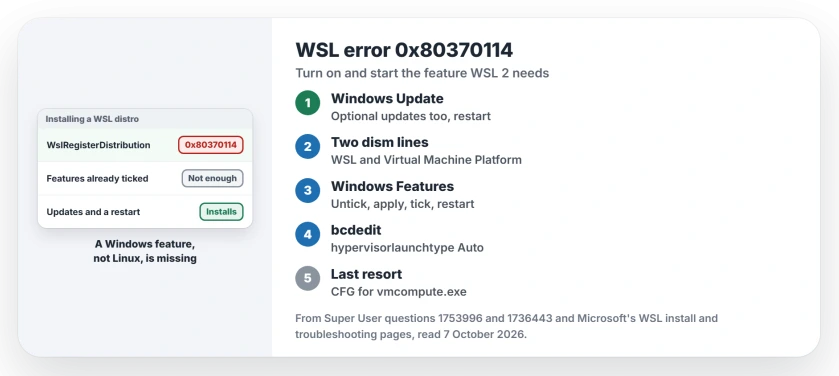
Status: checked 7 October 2026. WSL error 0x80370114 means a Windows feature WSL 2 needs is missing or not started. Owners fixed it with updates, the features, and the hypervisor.
Ours: work through these in order, and test your distro after each one. Each step reaches deeper into Windows than the one before it, so the easy ones go first. Stop once your distro installs.
Install what Windows Update is holding
The asker's own accepted answer: "Installed the Windows updates, and after restarting the Ubuntu installation resumed". WSL worked from then on. After the update, vmcompute.exe sat in System32, where it had been missing before.
Their PC had shown no pending updates when they checked earlier that day, after the reset. Updates can appear late. One reader on Windows 11 Pro wrote "Thanks this worked for me", when an optional update was the only one on offer.
So open Windows Update and check for updates. Install the optional ones too. Then restart your PC, even if Windows does not ask you to, and run your distro again.
If Windows Update itself will not finish, our Windows Update stuck page covers that first.
When you open Terminal for the commands, if it shows no tabs or title bar, focus mode is hiding them.
Turn on Virtual Machine Platform
Microsoft says on its manual WSL install page that "Before installing WSL 2, you must enable the Virtual Machine Platform optional feature". The other asker found WSL itself switched off.
Right-click Start and choose Terminal (Admin), then run both lines.
dism.exe /online /enable-feature /featurename:Microsoft-Windows-Subsystem-Linux /all /norestart
dism.exe /online /enable-feature /featurename:VirtualMachinePlatform /all /norestart
Restart when both finish. One reader confirmed: "Worked for me on a brand new Windows 22H2 installation". Another on Windows 11 Home simply wrote, "I needed to reboot". So never test before that restart.
Already ticked? Untick, apply, tick again
One owner had all three features on, and the error still appeared for them too.
You find the Windows Features window by searching Start for Windows Features and opening the result. In that window, they unchecked Virtual Machine Platform, Windows Hypervisor Platform and Windows Subsystem for Linux.
They clicked Apply and skipped the restart. Then they ticked all three again, clicked Apply a second time, and restarted the PC.
That moved them on to a sibling error, 0x80370102, which has a known fix. Microsoft's troubleshooting page covers that one by name. You may land there too.
Check the hypervisor switch and the BIOS
Microsoft says on its WSL troubleshooting page to "ensure virtualization is enabled in the BIOS". It also says to check that the hypervisor is switched on in your boot settings.
Open an administrator Terminal and run the first line to see it.
bcdedit /enum | findstr -i hypervisorlaunchtype
bcdedit /set hypervisorlaunchtype Auto
If you see Off, "the hypervisor is disabled", in Microsoft's words. The second line switches it back on.
For the owner who untoggled the features, it had been set to off months earlier, during another fix attempt. Setting it back to Auto, plus a restart, got WSL commands running for them again.
In your BIOS, virtualization is usually called Intel VT-x or AMD SVM, under the CPU settings. One owner had to turn it on in the BIOS before WSL would install at all, and also enabled Hyper-V.
Exploit protection, for the last few
Still stuck? Two owners traced it to Exploit protection. Open your Windows Security app, then App and browser control, then Exploit protection settings, then Program settings.
Find C:\Windows\System32\vmcompute.exe in your list, or add it with Add program to customize. Set Control flow guard (CFG) to Override system settings, On, and Use Strict CFG.
A reader said ticking Use Strict CFG too "is what made it work for me in Windows 11". Do the same for vmwp.exe, which runs the virtual machine itself, then restart.
What I would not do
One reader switched off Memory integrity under Core isolation to get past the error. I would leave that on. It protects the Windows kernel, and the steps on this page fix the same error without giving it up.
Falling back to WSL 1 with wsl --set-default-version 1 also stops the error, because WSL 1 needs no virtual machine. You lose what WSL 2 adds, such as a real Linux kernel and full system call support.
Use it only to keep working while you fix WSL 2.
A distro that worked for months and now fails to attach its disk is a different story. Check whose file went missing before unregistering.
If the WSL window simply flashes shut with no error code at all, the default distribution may be one that cannot start.
If WSL runs but File Explorer cannot open your Linux files, a missing P9NP network provider entry is the usual cause.
Does WSL 2 need Hyper-V?
No, it does not. Virtual Machine Platform is the feature WSL 2 needs, and it works on Windows 11 Home, where Hyper-V cannot be turned on.
Some readers on Pro still fixed it by adding Hyper-V in the same Windows Features window. On Pro, it is a fair last try.
WSL problems that start right after a Windows update can be a different story altogether. Our Claude Cowork Plan9 error page covers one that Microsoft fixed with a later update.
The Short Version
- Install every pending Windows update, optional ones too, and restart.
- Turn on Virtual Machine Platform and WSL with dism, then restart.
- If they are on already, untick all three features, apply, tick again, restart.
- Check hypervisorlaunchtype and virtualization in the BIOS.
- Last: Control flow guard for vmcompute.exe and vmwp.exe in Exploit protection.
Where to Next
Run the first bcdedit line now. An Off there explains your error straight away, before you change anything else.
Which step finally let your distro install? Tell me your Windows build, and I will keep the order of this page in line with what works.

Isaac Smith is the founder and editor of PC Glance, a website that covers computers, laptops, and technology. He is a tech enthusiast and a computer geek who loves to share his insights and help his readers make smart choices when buying tech gadgets or laptops. He is always curious and updated about the latest tech trends.