Yes, Microsoft Office runs on a Mac. Word, Excel, PowerPoint, Outlook and OneNote have Mac apps, available with the right Microsoft 365 plan or Office edition. Ordinary Office work doesn't require Windows.
The main choices are paid desktop apps or the free browser versions. Check your macOS version and the license you already own before buying anything, especially if you're moving from a Windows PC or replacing an older Mac.
In this guide
Choose desktop Office or the browser apps
Desktop Office installs in your Mac's Applications folder. It suits work that needs the installed apps and their features, while Microsoft 365's browser apps let you open and edit supported documents without installing the suite.
A desktop-app Microsoft 365 plan can cover Mac use under its account and device terms. For work or school, your administrator must assign a plan that provides the installed apps.
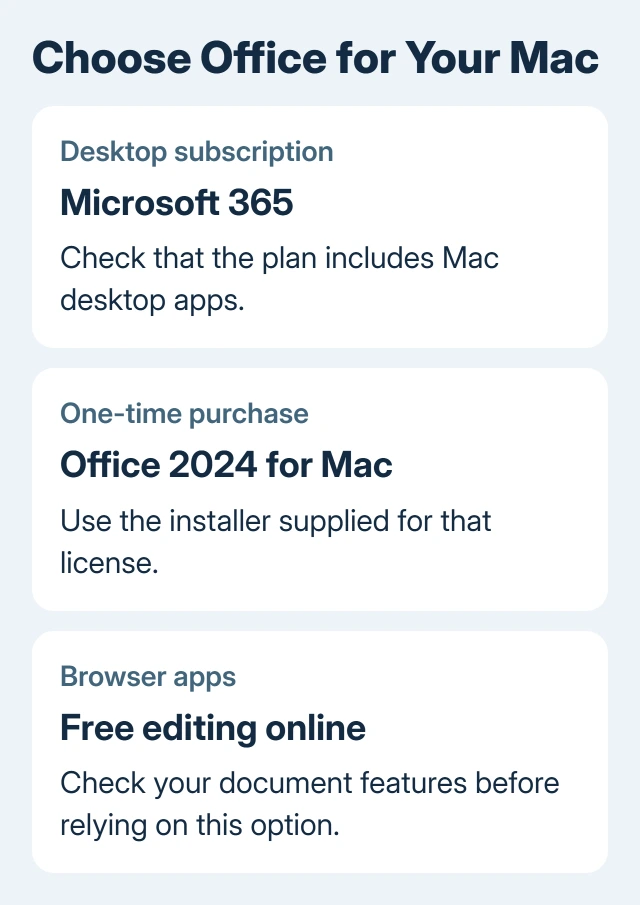
Don't assume that every product with Microsoft 365 in its name includes installed Word and Excel. Look at the plan's included apps and installation rights. Online account access alone doesn't include a desktop Office license.
For occasional editing, the free Office options can be enough. Try one of your usual documents and check that its features work before relying on the browser apps.
Office 2024 offers a one-time license for the covered computer. Check its included apps and Mac requirements. The Office buying guide compares it with renewing subscriptions.
Check the Mac before downloading
Open Apple menu > About This Mac. Read the macOS version and processor information. The computer may use Intel hardware or an Apple chip; supported Office for Mac releases run on both families.
Office supports the three newest major macOS versions: Golden Gate 27, Tahoe 26 and Sequoia 15 in November 2026. An existing copy opening on an older system doesn't mean it still receives security updates.
Microsoft's macOS support page explains that rolling support window. Check it before installing, since the supported versions change when another major macOS release arrives.
Current Office apps run natively on Apple silicon. Word and Excel don't need Windows to launch. An older plug-in can have separate requirements, so check that component if it needs a different arrangement.
A document with legacy math needs its own compatibility check: editing old Equation Editor objects on Mac differs from inserting new formulas.
I'd check compatibility before buying a replacement license. A new subscription can't make a Mac support an operating system it can't install, and an unsupported macOS version can be the reason an Office update won't arrive.
Download and install with the licensed account
Use the account you bought or subscribed to Office with. For work or school copies, use your organization's sign-in. Your personal and business sign-ins can show different products, even though both belong to you.
Sign in to m365.cloud.microsoft/apps and look for Install apps. Select the Microsoft 365 apps installation option offered for your license. The Mac installation instructions describe the account and download choices.
If installation isn't offered, check the account and plan first. A business administrator might need to assign desktop-app access. For a personal purchase, confirm you're using the account that redeemed it.
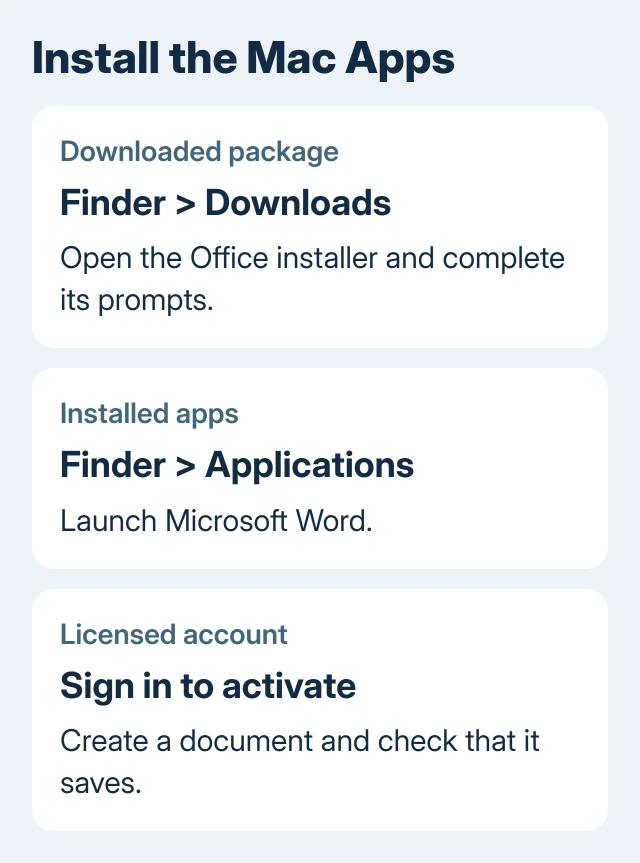
Open Finder > Downloads and double-click the Office installer package. Follow Continue, accept the license agreement and choose Install. Enter a Mac administrator's login details if asked.
After installation, launch Microsoft Word from Finder > Applications. Follow the opening screens, using the sign-in linked to your license. Create a blank document, type something and save it to check that activation finished.
Use the right installation for an Office 2024 purchase
App Store copies of Word, Excel and PowerPoint need Microsoft 365 for document creation and editing. A one-time Office purchase can't activate those copies, even when you sign in with its purchasing account.
For Office 2024, download the installer through the Microsoft account linked to your purchase. If App Store copies are already present, follow the replacement instructions to switch to the apps supplied for that one-time license.
That distinction matters when Word opens but asks for a subscription even though you've bought Office. Before buying again, check whether the installed app came from the App Store and whether the purchase is a one-time edition.
Updates also follow the installation route. App Store installations update through the App Store. Copies installed directly from Microsoft use Microsoft AutoUpdate, available from an Office app's Help > Check for Updates menu.
Check the apps and documents your work needs
Mac and Windows versions can open Word, Excel and PowerPoint files, but features and add-ins can differ. Try your actual work documents instead of deciding compatibility from the Office name alone.
For an archive of Works documents, convert the WPS files separately and check the output before relying on the new Office installation.
On the Mac, try a copy of one of your usual documents. Inspect fonts, layout, charts and your essential features. For workbook automation or an add-in, ask its publisher or IT whether that component supports Mac.
An Excel alert reading Cannot use object linking and embedding needs Mac-specific repair rather than Windows DCOM changes.
Access is a Windows-only application. Buying a Mac Office license doesn't add a native Access app. If a job depends on an Access database, ask IT how that database is meant to be used from a Mac before choosing a solution.
Activated desktop apps support offline work on local files. Subscription licensing still requires periodic internet access. Cloud documents and online features have separate connection requirements.
A missing OneDrive save location in Mac Office calls for comparing the Office and sync-app accounts before changing local folders.
Keep a test copy separate when checking a complex shared file. That lets you confirm the Mac workflow without replacing the working document before you've reviewed the result.
When Office installs but won't let you edit
Read Word's activation message before changing anything. A request to activate Office can mean an account or license problem, while an unsupported-system message calls for checking macOS instead.
An expired Office authentication session calls for checking saved sign-in access in the Mac keychain.
If the purchasing account owns Office but activation can't find it, sign out of the app and use that exact account again. For a business license, ask IT to check that your account includes access to the desktop apps.
For an old operating system, update macOS to a supported release if the Mac supports it, then update Office. If the Mac can't run a supported system, try your files in the browser apps or plan to replace it with a supported computer.
For persistent editing failures, use Help in the app or your account's Microsoft 365 support options. Give support your Office edition, macOS version, download source and activation message. Never publish a password or complete product key.
The Short Version
Office runs on supported Intel and Apple silicon Macs. Check macOS and your license, then install the desktop apps or use browser editing. A one-time purchase needs its own installer, rather than the App Store's subscription copies.
Checked November 16, 2026.