
Apple Watch Mindfulness notifications can stop because its reminders are disabled, the day's reminders are muted, or alerts arrive without a tap. Start in Settings > Mindfulness on the watch: enable a reminder and turn Mute for today off.
A missing prompt to log a mood needs a different setting. State of Mind reminders are managed in the iPhone's Health app, separately from Breathe and Reflect reminders.
Restore the Mindfulness reminders first
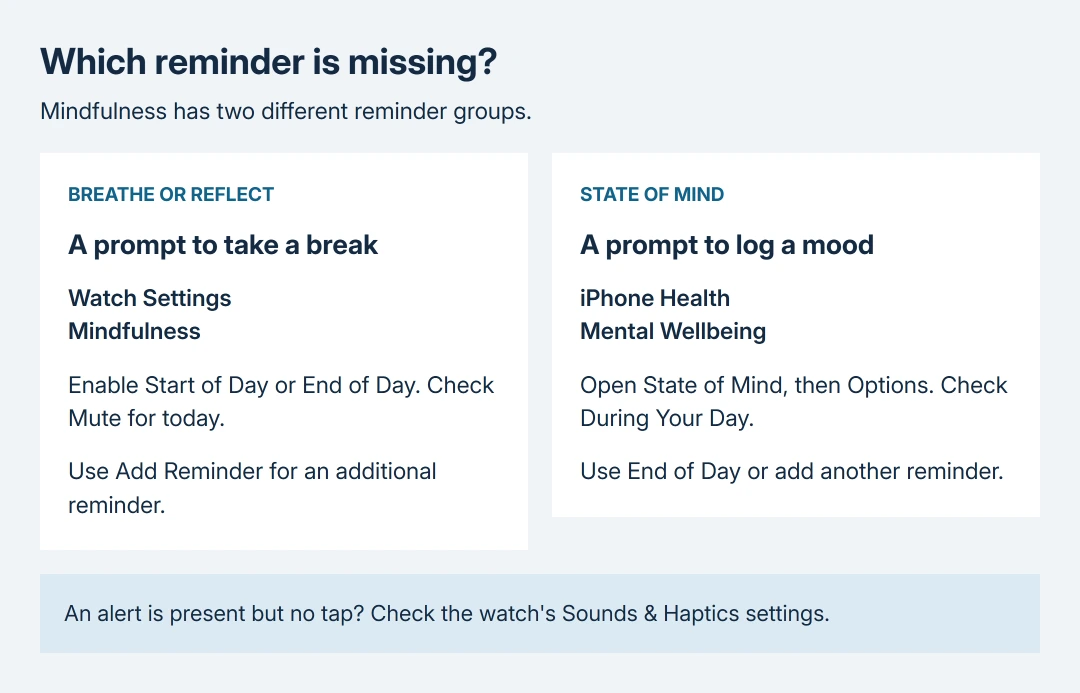
On the watch, open Settings > Mindfulness. Under Reminders, enable Start of Day, End of Day, or both. Turn Mute for today off so the daily mute does not suppress the reminders you have enabled.
Apple documents the session-reminder controls in its Mindfulness guide. On the paired iPhone, use Watch app > My Watch > Mindfulness for the same settings.
Status: Apple's watchOS 27 Mindfulness and notification instructions checked October 28, 2026. These are documented settings, not a confirmed fix for a watchOS bug.
Weekly Summary controls the weekly report. Enabling that alone does not enable the daily session reminders. Return to the reminder switches if the weekly report appears but invitations to Breathe or Reflect do not.
Add a reminder instead of guessing its time
In the same Mindfulness settings, tap Add Reminder and create an additional reminder using the choices shown. Wear the watch and unlock it before checking whether the reminder arrives.
My recommendation is to use one added reminder while checking this problem. Apple's guide does not assign a universal clock time to Start of Day or End of Day, so those names alone cannot tell you when a notification is overdue.
Open Mindfulness > Breathe to check whether a session starts manually. A working session proves the app can open, not that reminders work. If the session opens but the reminder never arrives, continue with notification delivery.
Check whether it arrived silently
From the watch face, touch and hold the top of the display, then swipe down when Notification Center appears. Look for the Mindfulness notification before dismissing anything.
An entry there means delivery happened. On the watch, open Settings > Sounds & Haptics > Haptics and choose Default or Prominent if it is set to Off. Wear the band comfortably snug so the watch's back touches skin.
Apple says Silent Mode can leave haptics working in its alert instructions. Raising volume will not restore a haptic alert that is switched off.
Press the watch's side button for Control Center and check for Do Not Disturb. Turn it off for the reminder check, then restore the quiet setting you want afterward.
If messages and other apps are also silent, use the Apple Watch notification checks. That broader failure needs attention to watch locking, Focus and each app's delivery settings.
If Control Center instead shows a red phone connection symbol, address the watch's connection to its iPhone. A disconnected watch explains missing phone-delivered alerts, but does not establish why a local Mindfulness reminder failed.
For mood prompts, change State of Mind options
An invitation to record how you feel is a State of Mind reminder. Changing the Breathe or Reflect schedule does not configure this separate reminder group.
Apple states the reminder choices in its State of Mind guide. Open Health > Browse > Mental Wellbeing > State of Mind, then Options. Enable During Your Day, End of Day, or an added reminder.
The watch's Mindfulness > State of Mind lets you log an entry manually. Apple directs readers to the iPhone Health settings for its reminder controls. A saved mood entry and an enabled Breathe reminder are separate things to check.
When the settings are right and reminders still fail
Record the reminder selected, whether a manual session opens, and whether any notification appears in Notification Center. Contact Apple Support with those details and the watchOS version, especially if only Mindfulness fails.
The Apple pages checked for this guide do not identify a specific watchOS defect causing this symptom or promise that reinstalling the app fixes it. A factory reset is too disruptive to recommend from these settings alone.
The Short Version
Check the Mindfulness schedule and its daily mute first. An alert already in Notification Center points to its sound or tap settings. Mood-logging prompts have their own switches under State of Mind in Health.

Isaac Smith is the founder and editor of PC Glance, a website that covers computers, laptops, and technology. He is a tech enthusiast and a computer geek who loves to share his insights and help his readers make smart choices when buying tech gadgets or laptops. He is always curious and updated about the latest tech trends.