
An APA citation for a PowerPoint includes the author, date, title, [PowerPoint slides], site, and URL when your readers can access it. If they can't, cite it in your text as a personal communication.
What matters is whether your reader can open the slides. Your instructor may have access through your class portal even when someone outside the class doesn't. The formats here follow APA 7.
Choose the format from the reader's access
Start with the slides you actually used. Check their title page for the author and date, then note where you found them. Even if you downloaded the file, your reader needs an address where they can access the slides.
APA explains how to reference public slides and classroom slides. Either can go in your reference list if the people reading your work can open them.
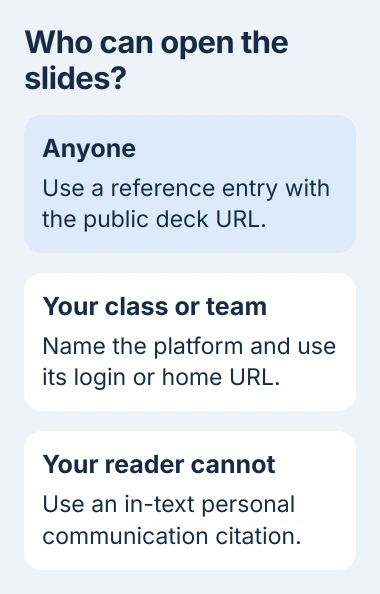
| Where the slides are available | What to use |
|---|---|
| Public website | Reference entry with the deck's URL |
| Class portal your instructor can access | Reference entry naming the platform and its login or home URL |
| Private presentation your audience cannot retrieve | Personal communication in the text |
A password doesn't automatically make a source unusable. Think about the people who will read your assignment, not whether a stranger on the internet could get into your course.
Check access again if you're writing for people outside your class or organization. You may need to cite the same private slides differently for those readers.
Build a reference for publicly available slides
Use this format, filling in the details from the slides and the page where you found them:
Author, A. A. (Year, Month Day). Title of presentation [PowerPoint slides]. Site Name. URL
Write the title in sentence case: capitalize its first word, the first word after a colon, and proper names. Put the title in italics, but keep the description in square brackets in ordinary type.
For practice, imagine a deck by Maya Brooks dated March 12, 2026, titled Planning a School Garden. These details are invented to show the format, not a source you should put in an assignment.
Brooks, M. (2026, March 12). Planning a school garden [PowerPoint slides]. Example University. URL
Replace URL with the real deck's address. Copy the source page's address rather than a local file path such as a Downloads folder. Your reader can't open a file that exists only on your computer.
If the slides name two authors, list them in that order with an ampersand (&) before the second. Use the people or organization credited as the author. The person who uploaded the file may not have written it.
The web page may show a different date from the slides. Check what that date refers to before using it. The date you downloaded a file isn't the date it was published.
Cite slides from Canvas, Blackboard, or another class portal
For course slides your reader can open, keep the author, date, title, and slide description in brackets. Name the learning platform as your source. If it needs a sign-in, use the platform's home or login address.
Using the same invented example, a class-portal reference would read:
Brooks, M. (2026, March 12). Planning a school garden [PowerPoint slides]. Canvas. Login URL
Replace Login URL with your school's portal address. A link to a specific page inside the portal may only work while you're signed in, so use the main address instead.
The classroom-source guidance uses the same rule for intranets, or private company sites. In a report for colleagues, you can cite materials they can open.
I'd collect the author, title, date, and source address while the slides are open. Trying to work them out later from a filename like lecture-final-v3 makes the reference much harder to check.
Add the matching citation beside your sentence
For the invented Brooks presentation, a citation in parentheses looks like (Brooks, 2026). If you name the author in your sentence, use Brooks (2026) and continue with the point you're explaining.
That short citation points your reader to the full reference, where they'll find the title and location. You don't need to repeat the whole URL after each sentence.
If the slides summarize a book or research paper, follow their citation to that original work. Read it before citing it directly. That gives your reader the source of the claim rather than only the lecturer's summary.
If your readers can't access the material, use the personal-communication format. Include the person's initials and last name, the words personal communication, and the exact date you have.
For an invented private lecture, that could be (M. Brooks, personal communication, March 12, 2026). Keep this citation in your text only. It doesn't go in the reference list.
Handle a missing date or author without guessing
If the deck gives no date, use n.d. in both the reference entry and the short citation. For the example author, the citation becomes (Brooks, n.d.).
If no author is named, put the presentation title where the author's name would go. First check whether an organization is listed as the author.
The missing-information table covers those combinations. Don't use Anonymous unless the work actually credits its author that way.
Format the finished entry in Word
Type each reference as one paragraph and let Word wrap it. Select the reference paragraphs, open the Home tab's Paragraph dialog, and choose Hanging under Special. Use the By field for the required indent.
Microsoft's hanging-indent instructions cover that setting. The Word hanging-indent walkthrough also explains the Mac route and why repeated Enter presses break the alignment.
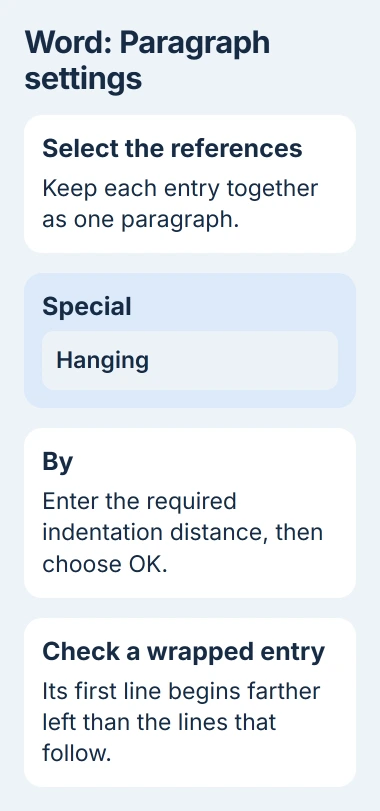
Check the paragraph after formatting. Its first line should start farther left than the rest. Keep the title in italics and the description in square brackets in ordinary type.
Citing someone else's slides is different from adding source notes to your own presentation. Use the PowerPoint footnote method to place a short note beside the content on your slide.
If you can't tell who wrote the slides or who can open them, show the file and assignment instructions to your instructor or library's reference desk. Check before finishing the reference so you don't have to guess.
The Short Version
For slides your reader can access, give the author, date, title, slide description, site, and URL. Use a class portal's login address for restricted course slides. Cite inaccessible presentations only in the text as personal communications.
Checked November 4, 2026.

Isaac Smith is the founder and editor of PC Glance, a website that covers computers, laptops, and technology. He is a tech enthusiast and a computer geek who loves to share his insights and help his readers make smart choices when buying tech gadgets or laptops. He is always curious and updated about the latest tech trends.