
Occasional Word, Excel and PowerPoint work may need only Microsoft's free web apps. Choose a Microsoft 365 subscription when its desktop apps, features or storage fit the task. Check what the account includes before starting another plan.
Office 2024 is also available as a one-time purchase for a computer. A subscription is therefore one way to get desktop Office, rather than a requirement for every document.
Try the free web apps with a real file
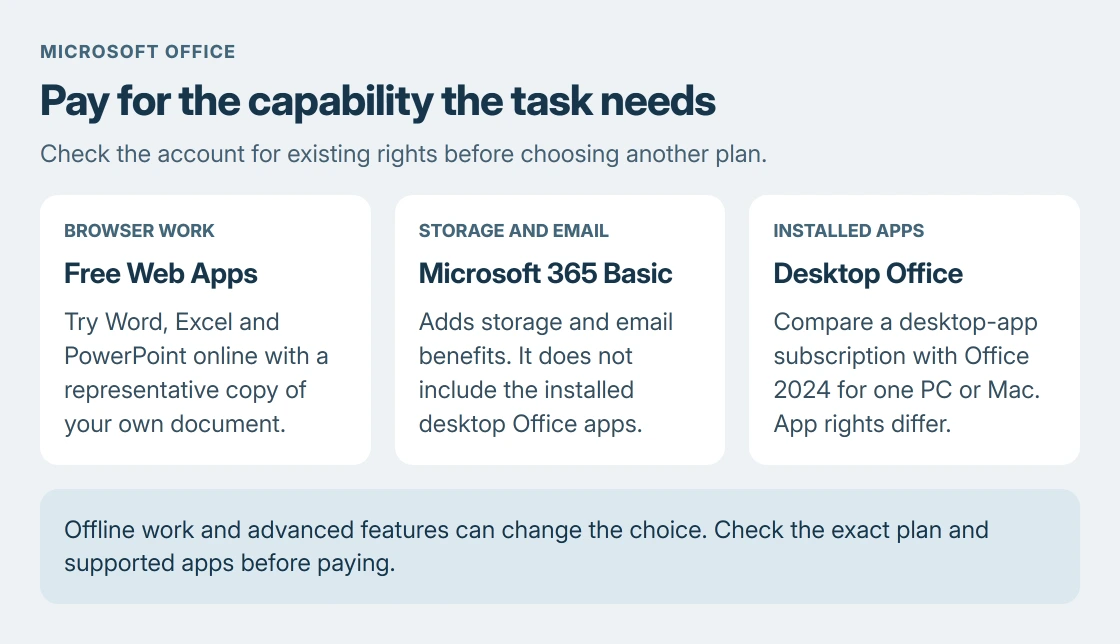
Sign in to Microsoft365.com with a Microsoft account and open the app launcher. Choose Word, Excel or PowerPoint. Microsoft says these free browser versions do not require a paid Personal or Family subscription.
Use a copy of a typical document to check the work that matters: editing its content, retaining its layout and sharing the result. A simple document that works in the browser does not prove a complex workbook will.
Status: Free web apps, Microsoft 365 Basic and Office 2024 distinctions checked 24 October 2026. No subscription was purchased and no account or document was accessed.
The free account includes 5 GB of OneDrive storage. Documents created in the web apps save online, so account access and available cloud space matter to that workflow.
For slides, build a short deck with the steps in the PowerPoint beginner's guide and see whether the browser version handles it. Check the version-specific feature notes before deciding that a missing button requires a purchase.
Choose desktop apps when browser work is insufficient
Write down the feature that the web version cannot provide for the actual file. That might be an offline workflow or a desktop-only capability. Compare that requirement with the current plan's included applications.
Microsoft documents the subscription-versus-purchase distinction in its Microsoft 365 and Office 2024 comparison. Plans with desktop apps allow installed Word, Excel and PowerPoint use.
Installed, activated Microsoft 365 apps can work offline, but the subscription is not an indefinitely disconnected license. Internet access is needed for installation, activation, updates and periodic subscription validation.
Check an existing work or school entitlement before buying a personal plan. Ask its administrator whether desktop apps are included and where personal files may be stored. An organization's license is not automatically a household license.
Do not buy Basic expecting desktop Word
Microsoft 365 Basic supplies storage and email benefits. It does not include the installed Office apps that come with desktop-app plans such as Personal.
That makes Basic a possible storage choice when the browser apps already do the job. It is the wrong purchase when the reason for paying is to install desktop Word or Excel.
Read the exact plan name on the account's subscription page. Plans with similar names come with different apps, and an installed trial is not a paid plan.
Compare Office 2024 for one computer
Microsoft states that Office 2024 is sold as a one-time purchase. It covers the included desktop apps for one PC or Mac, with security updates during its supported life. The next major Office release is a separate purchase.
The Office 2024 FAQ lists the editions. Office Home 2024 includes Word, Excel, PowerPoint and OneNote; Home & Business 2024 also includes Outlook.
Match the edition to the intended home, school or business use. Do not choose Home solely because the app list looks sufficient for a business workflow.
For someone using one computer with stable needs, the one-time option deserves comparison with a subscription. For several devices or changing feature needs, compare an eligible subscription's device and user allowances.
Check existing rights and storage before paying
Open the account's Services & subscriptions page and verify what is already active. In a Windows Office app, File > Account identifies the product; on a Mac, use the application's About command.
Cloud allowances depend on plan and subscription timing. Microsoft's page describes pooled-storage changes for new Family and Premium subscriptions from October 8, 2026. Check the allowance shown for the actual account.
An editing error on its own does not mean a new subscription is needed. For example, the Office save-error explanation for Mac separates a particular licensing-certificate fault from unsupported versions.
If an owned product is absent or its activation cannot be confirmed, contact Microsoft with the purchase record and account used. Resolve that entitlement before paying twice for the same requirement.
The Short Version
Try a representative file in the free web apps. Compare a desktop-app plan with Office 2024 when installed apps are needed. Basic covers storage/email benefits. Check existing account rights before another purchase.

Isaac Smith is the founder and editor of PC Glance, a website that covers computers, laptops, and technology. He is a tech enthusiast and a computer geek who loves to share his insights and help his readers make smart choices when buying tech gadgets or laptops. He is always curious and updated about the latest tech trends.