
Surface Pro 4 screen flickering needs a different response when the picture rapidly shifts, doubles or becomes scrambled. Check whether that distortion continues in UEFI before paying for Windows repairs.
Microsoft's replacement terms depend on the fault and purchase date.
Check whether the picture matches screen scramble
Microsoft documents scramble as a rapid vertical or horizontal shift that creates fuzzy, overlapping copies of the picture. Static, interlaced duplicates can also appear.
A changing brightness level or an occasional app flicker does not establish this fault.
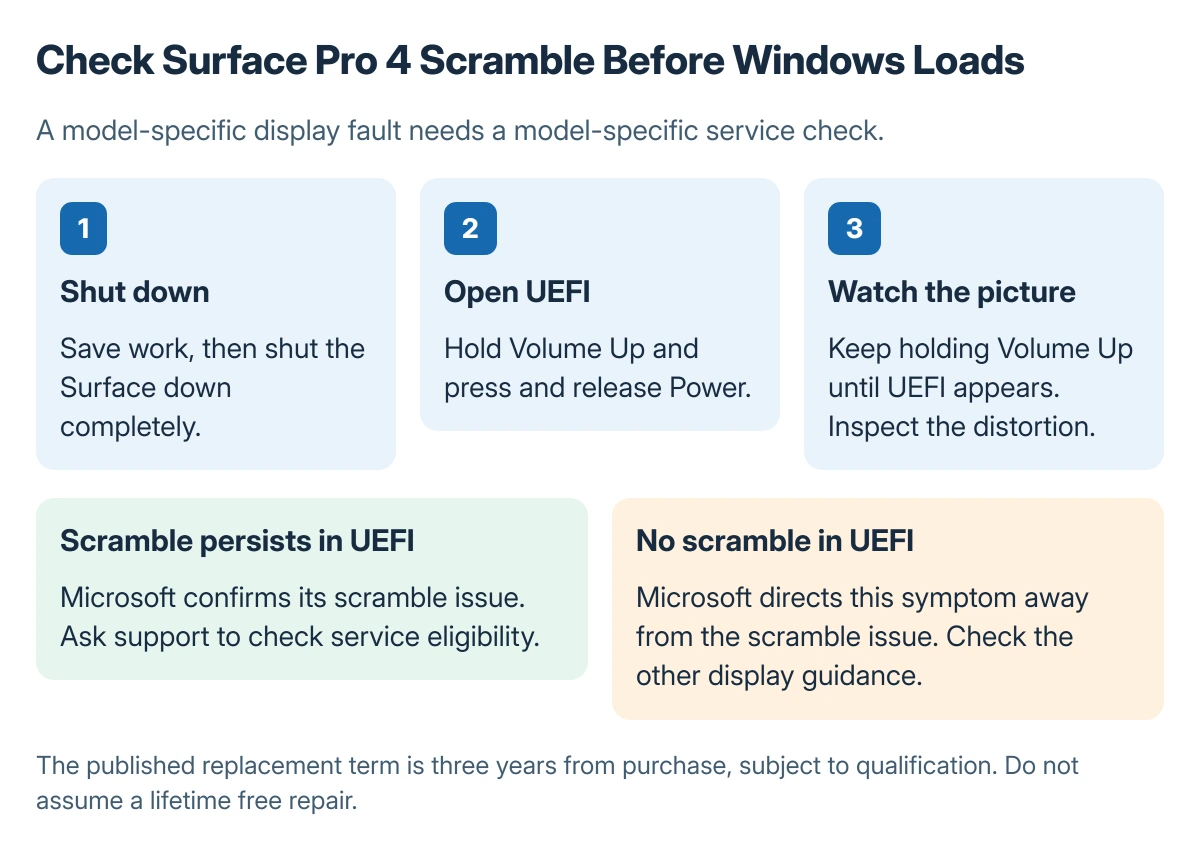
Status: Vendor-documented diagnosis and service route. No repair was tested here. The three-year replacement term is measured from purchase.
Pressing the display may briefly change the distortion, according to Microsoft's Surface Pro 4 guidance. That is not a repair. Avoid repeatedly pressing or bending the screen to keep it usable.
Look at the display before Windows loads
Save open work. Install the available Surface and Windows updates appropriate to the installed system first, as Microsoft's instructions require. Then check the firmware screen:
- Shut down the Surface.
- Hold Volume Up, then press and release Power.
- Keep Volume Up held until UEFI opens.
- Check for the same scramble without changing settings.
Microsoft says scramble that remains visible in UEFI confirms the issue covered by its scramble guidance. The fault is present before the usual Windows desktop and applications load.
If the distortion does not appear in UEFI, Microsoft says that symptom is not the scramble issue. Return to its general display troubleshooting.
The Windows screen flickering checks address a different route through applications and display drivers.
A failed detachable keyboard is a separate problem. The Surface keyboard connection checks can help with typing access; the UEFI entry method here uses the tablet's own buttons.
Ask Microsoft to check the actual service eligibility
Microsoft states that qualifying Surface Pro 4 scramble cannot be fixed by a firmware or driver update.
Its published offer provides a replacement within three years of the purchase date, subject to confirmation and the program's conditions.
That wording does not promise a free replacement for every Surface Pro 4 in 2026.
Gather the serial number and purchase evidence, then contact Microsoft Surface support to ask which paid or covered options are currently available for this device.
Explain whether the distortion appeared in UEFI. Let the support agent confirm eligibility and any available replacement before shipping the tablet or paying a repair fee. Back up accessible personal files before service.
If Microsoft cannot service it, request a written assessment and price from a reputable repair shop. Compare that quote with a replacement computer; software reinstalls are not a documented cure for confirmed scramble.
The Short Version
Check Surface Pro 4 scramble in UEFI. A matching fault there belongs on the hardware service route. Microsoft's three-year-from-purchase offer requires an eligibility check and is not a lifetime guarantee.

Isaac Smith is the founder and editor of PC Glance, a website that covers computers, laptops, and technology. He is a tech enthusiast and a computer geek who loves to share his insights and help his readers make smart choices when buying tech gadgets or laptops. He is always curious and updated about the latest tech trends.