
You open Music, land on Home, and there is nothing there at all. Library, New and Radio all behave normally, which makes it look as though Apple has broken something.
It is one setting, and Apple moved it back in iOS 18, so the instructions you will find online point at the wrong place entirely.
Let me take you to where it lives now, because Apple does not flag the move anywhere you would see it.
Check this before you touch the switch
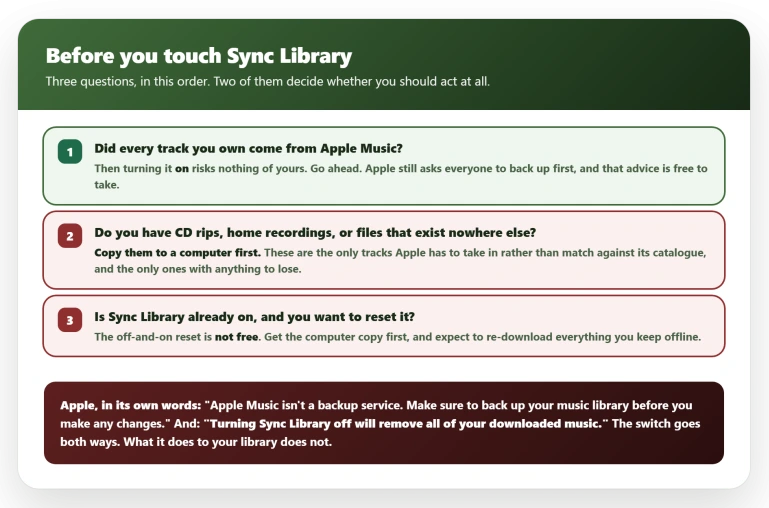
Apple's own instruction comes first, printed at the top of both its Sync Library pages: "Apple Music isn't a backup service. Make sure to back up your music library before you make any changes." That is addressed to everybody, not only to people with rare files.
If you have music that exists nowhere else, CD rips, home recordings, anything you have not bought or streamed from Apple, copy it to a computer first.
Those are the files Sync Library has to take in rather than simply match against Apple's catalogue, and they are the only ones with anything to lose.
Turning Sync Library off deletes your downloads. Apple states it twice on its own page: "Turning Sync Library off will remove all of your downloaded music." Everything you had saved for offline listening goes, and you get it back only by downloading it all again.
So the obvious reset, off and then on, is not free, and on a metered connection or a large offline library it is expensive.
That lands hardest on the reader whose Sync Library is already on, because that reset is the first thing they will reach for. Get the computer copy, and be ready to re-download.
The short answer
Go to Settings, Apps, Music, and turn on Sync Library. That is Apple's own path on iOS 26; it is no longer under Settings, Music on its own, and Apple's older support page still prints the outdated route.
If there is no Sync Library switch there at all, you are not subscribed. Apple requires an Apple Music or iTunes Match subscription for it.
Sync Library is set separately on every device. That is why a Mac can have it on, and show a perfectly normal Home tab, while your iPhone has it off and shows nothing.
Checking the Mac tells you nothing about the iPhone.
Give it a minute, then reopen Music. If the Home tab fills in, you are done.
If Sync Library was already on, the reset is to turn it off, wait, and turn it back on. Do that only once you hold a computer copy of any local-only music, and knowing it will clear your offline downloads.
How to tell this is the fault you have
This one has a clean shape, and checking it takes ten seconds.
Only the Home tab is empty. The owner who started the main thread described it exactly: "when I open Apple music on my iPhone the Home tab is blank. The other tabs, New, Radio and Library work fine." If Library is empty too, or the app will not open at all, that is a different problem.
The same account is fine on your other Apple hardware. The same owner found that Apple Music, "including the Home, works properly on my iMac … and Apple TV 4K" while his iPhone stayed blank.
That matters because it rules out your subscription lapsing, an outage, or your account being the problem. Whatever this is, it lives on the iPhone.
It may flicker back and then go again. He also noted it "occasionally comes back after a restart but always reverts to a blank page", so a restart that appears to work is not evidence you have fixed it.
Why Sync Library is the thing to check
Nobody set out to find this. One owner posted a comparison on 27 July that gives away the pattern without meaning to:
> "I have an iPhone 13 running iOS 26.5.2 in the United States. I do not have Sync Library enabled. Another family member has an iPhone 16, iOS 26.5.2 and Sync Library enabled and the home tab appears to work fine."
Two iPhones, same iOS version, same household, and only the one with Sync Library off is blank.
Do not read more into it than it holds. Different models, almost certainly different Apple Accounts, different music. The iOS build is the only thing actually held constant. A suggestive coincidence, not a test.
On 6 August another owner acted on it: "I tried turning on cloud sync and it did fix the issue." He is the only person on record who actually flipped the switch. The owner who spotted the pattern never says he tried it.
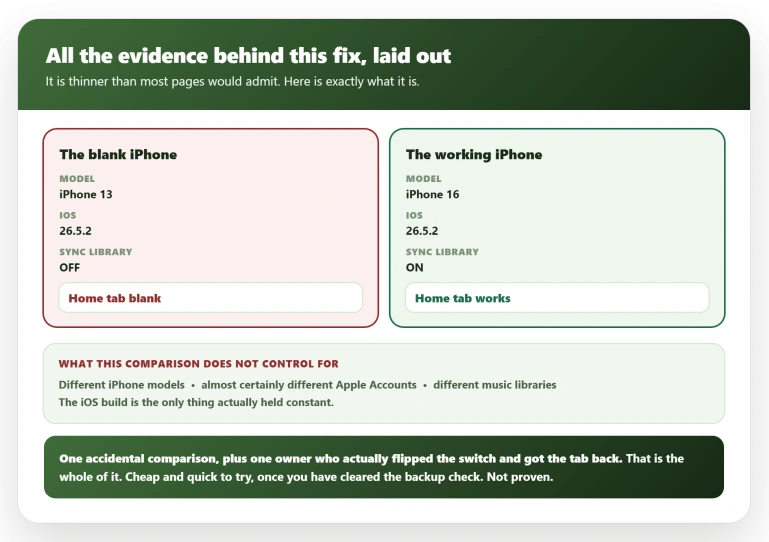
Hold that lightly. It is one accidental comparison and one person who acted on it, not a proven cause.
It is still the first thing to try, because it takes seconds and costs you nothing provided you cleared the local-music check at the top of this page.
The iCloud storage worry, answered
This is the part stopping people, and it deserves a straight answer rather than reassurance.
The fear is reasonable. Sync Library sounds like it uploads your music somewhere, and nobody on a full 5 GB wants another claim on it.
It does not touch your iCloud storage. Apple's page on managing your iCloud storage lists what the space is for: "your iCloud backups, to keep your photos and videos stored in iCloud Photos, to keep your files up to date in iCloud Drive, and more".
It also lists what stops working when you run out, which is backups, iCloud Photos uploads, iCloud Drive and iCloud Mail.
Searching that page for "Apple Music" or "music library" returns nothing at all, in either list.
An Apple Community Specialist answered it directly, though back in 2021: "it doesn't count against your iCloud storage as you're only accessing the music found in iTunes that Apple has stored in the Sync Library." Apple also states the Sync Library ceiling in songs, up to 100,000 of them, rather than in gigabytes.
A limit counted in songs is not your iCloud allowance.
One caveat worth stating.
If you have tracks that exist nowhere but your own devices, home recordings, rarities, things ripped from CDs, those are the files Sync Library has to handle rather than simply match.
That is the one case to pause over, and the safe move is to keep a copy on a computer before switching anything on. If your library is all Apple Music, there is nothing to lose.
A genuinely full iCloud storage causes trouble elsewhere, just not here. The usual first sign is iCloud Photos stalling on syncing paused.
If Sync Library is already on
Switching it off and back on forces the link to rebuild, and the link is exactly what appears broken.
It also deletes every download on the phone, in Apple's own words, so treat it as a real cost rather than a free reset, and do not do it until you hold a computer copy of any music that exists only on your devices.
Beyond that, owners in the threads report two things working:
- Sync from a computer, but mind the order. One owner cleared it by plugging the iPhone into a Mac and running a music sync, though he installed a software update in the same session, so the sync is not cleanly the cause. Note the catch we have already published: Finder only offers music syncing with Sync Library off, so that screen is empty for anyone who has just turned it on. Use this route before you try the switch, or not at all.
- Leave the iPhone switched off for a while. The same owner got the Home tab back after an hour with the phone off, and lost it again afterwards. Treat it as a reprieve, not a fix.
If none of that helps, what is failing is the personalised feed Apple builds for your account on this particular device, and the plain answer is that it is waiting on Apple.
There is no deeper setting to reach for, and resetting the iPhone will not conjure content that Apple is not sending.
Keep the Sync Library change in place while you wait, since leaving it on rules that setting out for good.
Did iOS 26.6 fix it?
No. The one report that looks like it did falls apart a few posts later.
The owner who started the main thread updated and posted on 28 July: "Well my hope after the update to iOS 26.6 was dashed as it is still not working. Apple you all better work on this!"
A second owner did post the opposite result that morning. Eight hours later he posted again: "And now the Home Screen is blank again." He then opened his own thread reporting it blank on an iPhone 17 Pro as well.
So nobody on record has had 26.6 fix this durably. One brief return lasting a morning is the closest anyone came.
Install 26.6 for its own reasons, which our page on what iOS 26.6 actually changes covers, but not for this.
Status: reported from 10 July 2026 on iOS 26.5.2 and still arriving on 6 August. Apple has acknowledged nothing, and no owner reports iOS 26.6 fixing it durably. Recheck when iOS 27 ships.
What does not help
- Force closing the Music app. Tried and reported as useless by the owner who opened the thread, along with signing out and back in.
- Deleting and reinstalling Music. Same owner, same result. The Home tab is server-fed content, not something a fresh install rebuilds.
- Restarting the iPhone, except as a temporary reprieve. It brings the tab back for some people and then loses it again.
- Sitting tight for the next release. iOS 26.6 did not hold for anyone, so the Sync Library switch is the thing to reach for rather than the calendar.
- Canceling and resubscribing. This one does damage. Somebody in the thread asks whether cancelling might be "the reset I need". It is not. Apple: if you cancel, "your music library is removed on all of your devices except for the original computer where your music library is downloaded", along with playlists built from the catalogue. Nothing in the reports points at the subscription anyway.
Does turning on Sync Library use my iCloud storage?
No. An Apple Community Specialist has answered this directly: it does not count against your iCloud storage.
Apple's own page on managing iCloud storage never mentions Apple Music or a music library either.
Copy any music that exists only on your devices to a computer first, because Apple asks everyone to back up before changing this setting.
Why is only the Home tab blank in Apple Music?
Because Home is the one tab assembled for you personally, from your listening and your library.
New and Radio come from Apple's servers too, but they serve the same content to everyone in your region, so they carry on working when the personalised feed does not. Library is local to your account.
That is also why reinstalling the app does not bring Home back.
Is Apple Music down, or is it my iPhone?
Almost certainly your iPhone.
The owner who opened the main thread found his account working normally on a Mac and an Apple TV at the very moment his iPhone showed nothing, which is not how a service outage behaves.
Open Music on any other device you own before going further.
The Short Version
- Turn on Sync Library under Settings, Apps, Music. On iOS 26 it is no longer under Settings, Music on its own.
- The pattern was found by accident: two iPhones in one household on the same iOS version, and only the one with Sync Library off had a blank Home tab.
- One owner confirmed the fix on 6 August. That is one accidental comparison and one confirmation, so treat it as cheap and reversible rather than proven.
- It does not use your iCloud storage. Apple's own storage page never mentions Apple Music or your music library.
- Only the Home tab is affected. Library, New and Radio keep working, and the same account is fine on a Mac or Apple TV.
- No owner reports iOS 26.6 fixing it durably. One brief return lasted a morning before going blank again.
- Force closing, reinstalling and signing out have all been tried and reported as useless.
- If you own music that exists nowhere else, keep a computer copy before switching anything on.
Where to Next
Turn on Sync Library and give it a few minutes. That is the whole fix for most people.
The setting moved in iOS 26, which is why the instructions you find point at a screen that no longer exists.
If Home is still blank with Sync Library on and everything else working, tell me how long your Apple Music subscription has been running, because a new account genuinely has nothing to build a Home tab from yet.

Isaac Smith is the founder and editor of PC Glance, a website that covers computers, laptops, and technology. He is a tech enthusiast and a computer geek who loves to share his insights and help his readers make smart choices when buying tech gadgets or laptops. He is always curious and updated about the latest tech trends.