
You double-click a game, an installer or an app, and a small box appears instead: "The code execution cannot proceed because MSVCP140.dll was not found." A second box often names VCRUNTIME140.dll.
I would install Microsoft's Visual C++ Redistributable twice, the x86 package and the x64 package, then restart. That is the accepted answer on the biggest thread, and owners kept coming back to say it worked.
The step I would skip is copying a single DLL into System32.
On Microsoft's Q&A, 2,900+ people pressed Same question on the Windows 11 version alone.
What the two files are
Both belong to the Visual C++ runtime, a set of shared files that many Windows programs lean on. Microsoft says the package "installs Microsoft C and C++ Runtime libraries."
Your app expects Windows to have them, and a fresh install often does not. The 2,900+ asker hit it straight away: "Made a full clean factory reset on my computer to start with a fresh and upgraded windows 11."
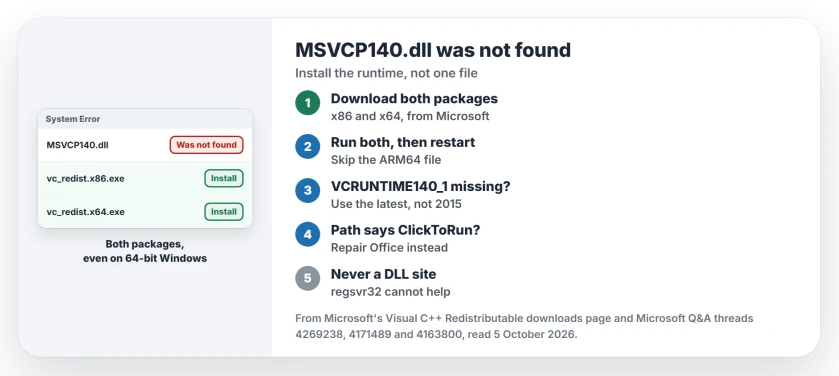
Status: checked 5 October 2026. Owners fixed it by installing both Visual C++ packages from Microsoft, x86 and x64. One Office owner needed only the latest x64 package.
Install both packages, x86 and x64
Microsoft keeps the current packages on its Visual C++ download page. Download vc_redist.x86.exe and vc_redist.x64.exe from there, run both, then restart.
Both, even on 64-bit Windows. Microsoft says "The redistributable package architecture must match your app's target architecture." A 32-bit app wants the x86 package, whatever Windows you run.
Skip the ARM64 file. Microsoft says the x64 package already carries the ARM64 files, for PCs with ARM chips.
The replies on the 2,900+ thread read like a tally. "Downloading both of them helped it work perfectly. Thank you!" Another owner: "Thank you. It worked for me."
When x64 alone changed nothing
This is the common miss, and the first thing I would check.
One owner had installed the 64-bit package in April 2023 and still got both errors. The reply they marked as the answer: "You also need the x86 version of the Microsoft Visual C++ Redistributable installed."
The adviser gave the reason in the next line: "Some applications are developed on x86 and require the x86 version." A 2020 owner with a new hard drive got the same advice and replied: "You my friend I love. thanks so much!!!!"
Use the latest package, not the 2015 one
Older answers still link the 2015 download. Microsoft now says "Support for Visual Studio 2015 ended on October 15, 2025." Apps built with Visual Studio 2017, 2019, 2022 or 2026 can all use the latest package, Microsoft adds.
VCRUNTIME140_1.dll is where the old package falls short. A 2024 owner installed both 2015 packages and Death Stranding still asked for it.
Microsoft's rule explains why. The installed package "must be the same or later than the version of the MSVC Build Tools used to create your application." Ours: if the missing name ends in 140_1 or 140_2, go straight to the latest download.
An Office 2019 owner on Windows 11, where only Word would open, ran the latest x64 package and wrote: "Problem resolved!!!"
When the path says ClickToRun
Read the path in the box you got. If it runs through Common Files, Microsoft Shared, ClickToRun, the missing file is Office's own copy, not the shared one.
An adviser on that thread ended with: "If that doesn't help, reinstalling Office 365 should fix the issue." Ours: repair Office first, from Settings, Apps, Installed apps, Microsoft 365, Modify, then Online Repair.
Never download the DLL on its own
A 2019 owner tried exactly that. They downloaded msvcp140.dll, pasted it into System32 and tried to register it. Windows replied that "the entry-point DllRegisterServer was not found".
Ours: regsvr32 cannot help, because these runtime files have nothing to register. And a loose file from a download site gives you whatever version that site picked.
Microsoft prefers the full package for a reason: "Central deployment by a redistributable package makes it possible for Microsoft to service runtime library files independently."
If the installer refuses
Microsoft's troubleshooting page puts security software first: "Antivirus software often blocks installation of VC Redist components." It also says to run the installer as administrator.
You may instead be told a newer version is already installed, as a 2023 reader was. Ours: then open Settings, Apps, Installed apps, find the Visual C++ 2015-2022 entries, choose Modify and Repair.
What did not help
Repairing older packages. One owner wrote: "I even tried to repair the 2012 but still got msvcp140.dll and vcruntime140.dll when trying to install a third party app."
Reinstalling the program, as the box suggests. The 1,400+ asker: "I have then tried multiple times to reinstall the specific programs that I was attempting to open, and I once again have the same issue with opening it."
When both packages fail, the app may want something else. Microsoft's own advice: "If you're trying to fix an app by updating the Visual C++ Runtime libraries, contact the app vendor for instructions."
Is it safe to download MSVCP140.dll from a DLL website?
I would not. Microsoft's package puts the right version of every runtime file in place, and Microsoft can update it later. A single downloaded file gets neither.
Do I need both x86 and x64 on 64-bit Windows?
Yes, if any of your apps is 32-bit. The package has to match the app, not Windows, and the two install side by side.
Why did this start after a reset or a new PC?
A reset clears out the packages your old apps had installed. A reset is still the right tool for a broken Windows, but expect to install these packages again.
The Short Version
- Install vc_redist.x86.exe and vc_redist.x64.exe from Microsoft.
- Restart, then open the app again.
- Missing VCRUNTIME140_1.dll? Use the latest package, not 2015.
- Path through ClickToRun? Repair Office.
- Never copy a DLL from a download site.
- Still failing? Ask the app's maker which runtime it needs.
Where to Next
Open Microsoft's Visual C++ download page now and run both installers, x86 first. Restart before you try the app again.
Did both packages fix it, or did your app need something else? A comment with the app's name helps the next reader.

Isaac Smith is the founder and editor of PC Glance, a website that covers computers, laptops, and technology. He is a tech enthusiast and a computer geek who loves to share his insights and help his readers make smart choices when buying tech gadgets or laptops. He is always curious and updated about the latest tech trends.