
You updated to iOS 27 for the new parental controls, opened Settings, and found the old Screen Time staring back at you. No Get Started. No new options for your child.
Before you blame your own phone, know this. It is about your whole family. The new controls wait for every device in your Family Sharing group, not just yours.
I will take you through what Apple requires, then the fixes owners found, starting with the quickest. One of them involves a device you may have forgotten you own.
Why they are not showing
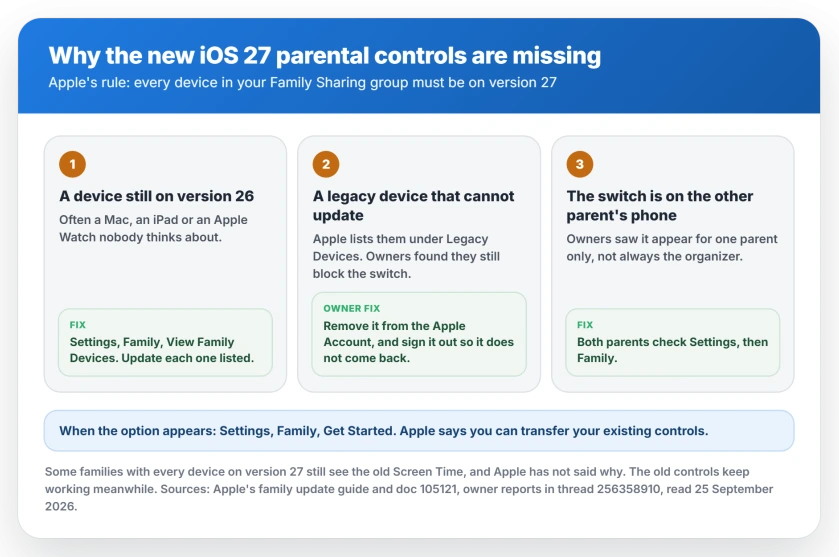
Apple spells out the rule on its parental controls page. To get the new controls, "make sure every device in your Family Sharing group is using these software versions."
That means iOS 27, iPadOS 27, macOS 27, watchOS 27 and visionOS 27. Apple adds that the organizer or a parent "also needs to update the parental controls for the family group."
A Level 6 member of Apple's forum put it in plain terms: "every device in the Family Sharing group has to be on version 27 or later". One old iPad or Mac is enough to hold the whole family back.
1. Find the devices still holding it up
Apple gives you a list, so start there. Go to Settings, then Family, then View Family Devices.
Apple says it shows "the list of devices that can be updated", for you and for the other parents in the group. Check it from a parent's device.
One owner found the list alone was not enough. They had to check "each family members device list separately", covering Macs, iPhones, iPads and Watches.
2. Update every device on the list
On each one, go to Settings, General, Software Update. Macs use System Settings, General, Software Update.
Do not skip the Macs and Apple Watches. One owner found "the option to upgrade was just sitting there in the settings of a 2022 Mac Mini".
So check the forgotten devices too. The Watch on a child's wrist and the Mac in a spare room count as much as your iPhone.
3. Deal with devices that cannot update
Some devices can never get version 27. Apple lists them under Settings, Family, View Family Devices, then Legacy Devices.
Apple says those devices "can still use Screen Time and Family Sharing settings from iOS 26" or earlier. Owners found they still block the switch.
One family had "Intel MacBooks that are still perfectly functional but cannot update to macOS 27." They wrote that "Apple was identifying these as Legacy Devices".
Their fix was to remove them from their Apple Accounts: "After we removed the legacy devices from all of the relevant Apple Accounts, we were finally given the option to update/migrate our parental controls."
Apple documents removing a device you no longer use. It also warns what that costs. Removed devices "won't have access to iCloud, Find My, or other Apple services", so only remove one you can live without.
If that device is still signed in, Apple says it "might reappear" the next time it connects. To stop that, sign the device itself out of your Apple Account.
Some owners do not see the Legacy Devices entry at all. One owner wrote: "I do not even have the menu item that shows 'legacy devices'."
4. Check the other parent's iPhone
This step trips up two-parent families. The switch does not always appear on the organizer's phone.
The family that removed its old Macs said "the option NEVER appeared on my iPhone". It showed up on the other parent's phone. Another owner said the same: it "only showed up for my wife on her account".
Two parents or guardians in your group? Both of you should open Settings, then Family, and look.
5. Start the switch from Settings
Once the option appears, Apple's route is short. Go to Settings, select Family, then tap Get Started.
Apple says you can then "transfer your existing parental controls or set up new ones". Your current limits and restrictions carry across if you transfer them.
If your child's requests stop reaching you after the switch, Ask to Buy has its own set of checks.
If everything is on 27 and still nothing
You are not alone here either. I will not dress it up. Several owners have every device updated and still see the old screens.
One wrote: "I still have the old Screen Time interface." Another: "The parental controls still do not show up." Apple has not explained why. No fix has been reported yet.
Apple Support told one organizer to leave the family group. As that organizer pointed out, the organizer cannot leave. The suggestion went nowhere.
Meanwhile, the old controls still work. Apple says you "can continue to use the previous version of Screen Time and parental controls, or adjust the parental controls directly on the child's device."
If Content and Privacy Restrictions will not switch off at all, that is a separate lock. Your Apple Account's age check can hold that switch on.
Status: iOS 27.0, checked 25 September 2026. Apple says every device in the Family Sharing group must be on version 27 before the new parental controls appear, and lists devices to update under Settings, Family, View Family Devices. Owners unblocked it by removing legacy devices and by checking the other parent's iPhone. Some families with every device updated still see the old screens, and Apple has not explained why.
Why are the new parental controls not showing in iOS 27?
Apple says every device in your Family Sharing group must be on iOS 27, iPadOS 27, macOS 27, watchOS 27 or visionOS 27 first. The organizer or a parent also has to start the switch. One device on an older version is enough to keep the old Screen Time.
How do I see which family devices need updating?
Go to Settings, then Family, then View Family Devices. Apple says it lists the devices that can be updated. Devices that cannot update are under Legacy Devices on the same screen.
Do legacy devices block the new parental controls?
Apple says legacy devices can keep using the older Screen Time settings. Owners report they blocked the switch anyway, and one family got the option only after removing old Intel Macs from their Apple Accounts.
Why does the option only appear on my partner's iPhone?
Owners report the switch appearing for one parent and not the other, including on a parent who is not the organizer. Both parents or guardians should check Settings, then Family.
Can I still use the old Screen Time?
Yes. Apple says you can continue to use the previous version of Screen Time and parental controls, or adjust the parental controls directly on the child's device.
The Short Version
- Every device in your Family Sharing group has to be on version 27 first.
- Find them under Settings, Family, View Family Devices.
- Update forgotten Macs and Apple Watches too.
- Legacy devices can still block it, so owners removed them from their Apple Accounts.
- Check the other parent's iPhone, because the switch can appear there instead.
- When it appears, go to Settings, Family, Get Started.
- Some families with everything updated still see nothing, with no fix yet.
- The old Screen Time keeps working in the meantime.
Where to Next
Start with View Family Devices. It names the device holding you up. Then work down the checks in order.
Found a different device or setting that unblocked it for you? Share it in the comments. The next parent stuck on the old screens will want to know.
And if purchases stopped reaching the family once you started moving things around, shared purchases have their own set of rules.

Isaac Smith is the founder and editor of PC Glance, a website that covers computers, laptops, and technology. He is a tech enthusiast and a computer geek who loves to share his insights and help his readers make smart choices when buying tech gadgets or laptops. He is always curious and updated about the latest tech trends.