
Chrome disabled on Android can disappear from the app drawer while remaining installed. Open Settings > Apps > Chrome and look for Enable. That turns the installed app back on without requiring its storage to be cleared.
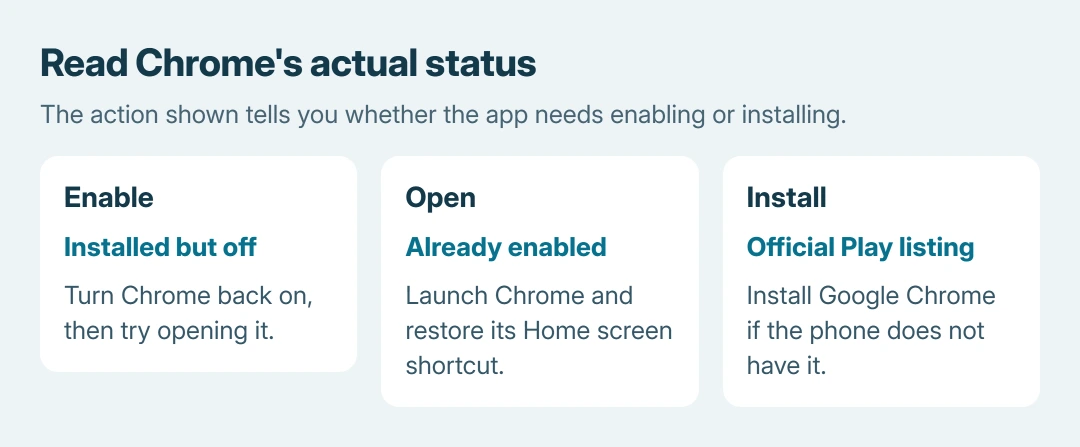
An available Open button means Chrome is already enabled. An absent package or a restricted control needs a different next step, so check the app's actual status before trying repairs.
Find Chrome's app information and enable it
Open the phone's Settings, choose Apps, then select Chrome. Google's steps include See all apps or App info as possible intermediate controls in its Android Chrome instructions.
If the entry is disabled, tap Enable. Google's built-in app guidance documents this as the reversal of Disable. Menu wording varies by phone, so searching Settings for Chrome can help locate the installed entry.
Status: Google's Chrome, Android app-enabling and installation pages checked October 26, 2026. Controls vary by handset; no app or phone setting was changed.
Return to the app drawer and try opening Chrome. If it opens, the disabled state is resolved. Missing a Home screen shortcut afterward is a placement issue, rather than evidence that Chrome still needs enabling.
Google says a disabled preinstalled app becomes unavailable until it is enabled again. That explains why searching only among the visible app icons can miss the installed copy.
Use Open or Install according to the actual listing
If App info already offers Open, try that control. When Chrome launches there, add its shortcut back by opening the app drawer, holding Chrome's icon and dragging it to the Home screen.
If Chrome is absent from the complete installed-app list, open Google Play and find Google Chrome, published by Google LLC. Use Install if offered. Google's Chrome download page links to the official listing.
Use Enable if that listing offers it instead. If it offers Update, install the available update and try opening Chrome afterward. The displayed action matters more than whether the Home screen currently has a Chrome icon.
Google states that Chrome is preinstalled on most Android devices and can be disabled rather than removed. Other installations can behave differently; do not assume every phone must offer the same buttons.
Separate a blocked control from an app that crashes
A gray or unavailable Enable control needs the phone maker's help. For an employer's or school's phone, give its administrator the exact message and ask whether Chrome is restricted. Repeated taps cannot override a managed setting.
If Chrome opens and immediately closes, its installed state has already passed the enabling check. Follow the Android app crash checks for that separate symptom, rather than repeatedly disabling it.
Avoid using Clear storage, package-removal tools or a factory reset simply to restore access to a disabled browser. Those operations have different effects. Our Android app removal guide distinguishes uninstalling from disabling.
Enabling Chrome also does not guarantee recovery of old tabs or information previously erased.
If the official installation fails or Chrome remains unavailable, send the manufacturer the model, Android version and the exact Play Store or App info message.
The Short Version
Find Chrome in the complete Settings app list and use Enable. Open means the app is already active; Install on its official Play listing offers installation.
A restricted button needs administrator or manufacturer help, while a launch crash needs app troubleshooting.

Isaac Smith is the founder and editor of PC Glance, a website that covers computers, laptops, and technology. He is a tech enthusiast and a computer geek who loves to share his insights and help his readers make smart choices when buying tech gadgets or laptops. He is always curious and updated about the latest tech trends.